Authentication
Authentication
Authenticate to the Asks API with a workspace API key, and limit what each key can do with scopes.
The API authenticates with a workspace API key, passed as a Bearer token. Every request is scoped to the key's workspace — a key can never read or write another workspace's data.
Plan requirement — API keys and the REST API are available on the Business plan and above. If a workspace downgrades or its plan lapses, its keys are kept but every request returns 403 with code forbidden until the plan is upgraded again. See Limits & quotas.
Create a key
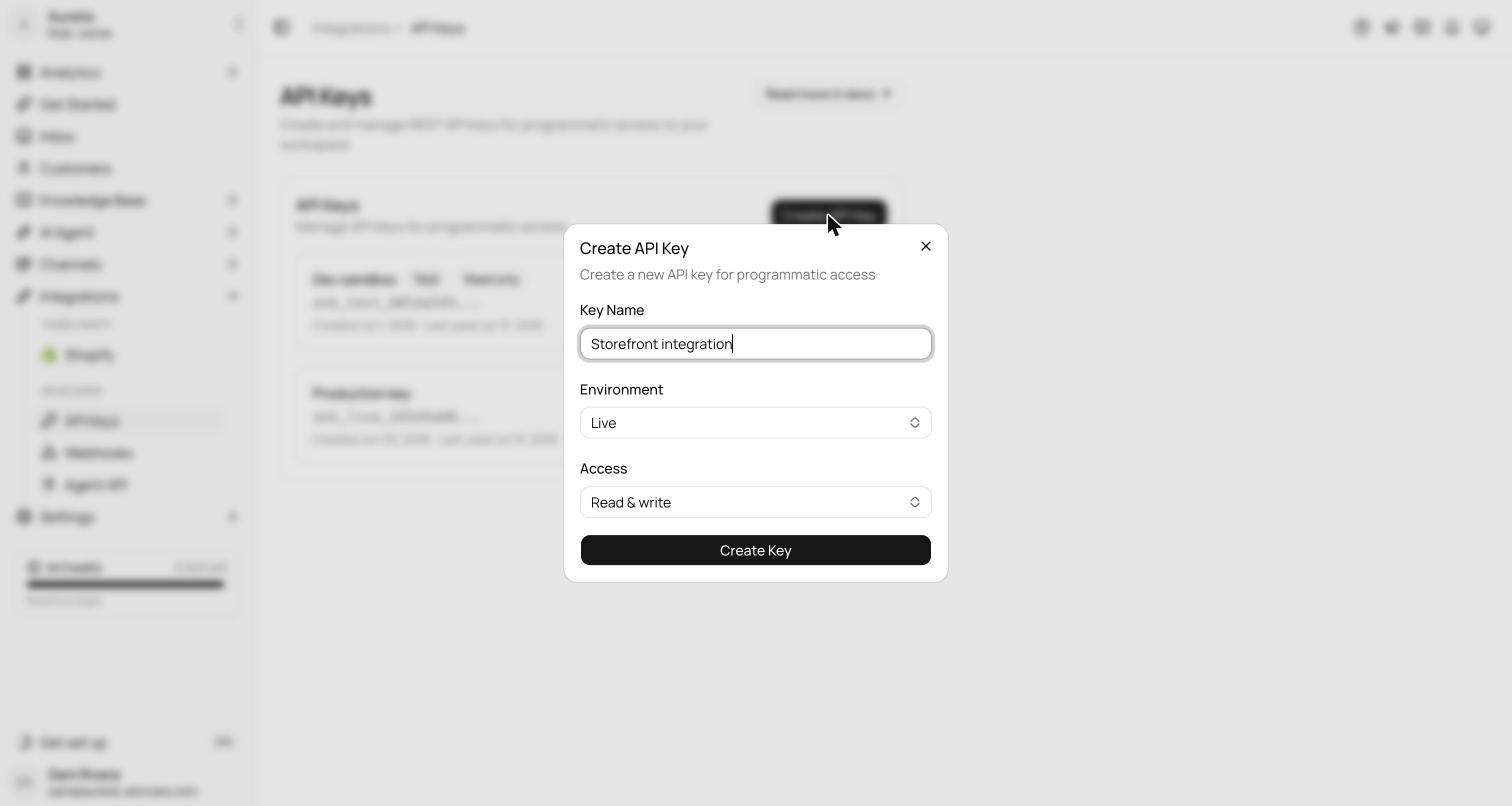
Go to app.asks.app/integrations/api-keys (Integrations → API Keys) and select Create API Key. Only workspace owners and admins can create, view, and revoke keys. A key has:
- Key name — a label for your own reference ("Production backend", "Zapier").
- Environment — Live or Test. Live keys start with
ask_live_, test keys withask_test_. - Access — Read & write (the
read+writescopes) or Read only (thereadscope).
The full key is shown once, at creation. Copy it immediately — Asks stores only a SHA-256 hash, so it can never be shown again.
Test keys are not a sandbox. The environment is a label for organizing your keys — a ask_test_ key authenticates against the same workspace and the same production data as a ask_live_ key. There is no isolated test dataset. Use test keys to separate integrations, not to experiment on throwaway data.
Authorize a request
Send the key in the Authorization header. The examples in these docs read it from an ASKS_API_KEY environment variable — keep the value private and out of source control.
curl https://api.asks.app/v1/me \
  -H "Authorization: Bearer $ASKS_API_KEY"
GET /v1/me returns the workspace, environment, and scopes the key resolves to — useful as a connectivity check.
Scopes
Scopes limit what a key can do. The dashboard's access presets map to the coarse grants: Read & write is read + write, Read only is read. Each endpoint checks a per-resource scope from the table below, and those per-resource scopes are what you approve when you connect an assistant to the MCP server over OAuth.
| Scope | Grants |
|---|---|
* | Everything. |
read | Every read action (any …:read). |
write | Every write action — and reads. |
conversations:read / conversations:write | Read vs. create and update conversations, add internal notes, and manage tags. Reading canned responses needs conversations:read. |
messages:write | Send messages to the customer in a conversation. |
customers:read / customers:write | Read vs. create and update customers. |
channels:read | List connected channels. |
tickets:read / tickets:write | Read tickets and teams vs. update a ticket's status, priority, assignee or team. |
knowledge_base:read / knowledge_base:write | Read knowledge sources and articles vs. create, update and re-crawl sources. |
knowledge_base:delete | Delete knowledge sources. |
agent:read / agent:write | Read vs. update the agent configuration; agent:read also allows knowledge search. |
agent:chat | Send messages to the AI agent (POST /agent/messages, asks_chat over MCP). |
analytics:read | Read the analytics overview. |
webhooks:manage | Manage webhook endpoints and read the event log. |
products:read | Read the Commerce catalog. Workspaces with Commerce only. |
orders:read / orders:write | Read vs. create Commerce orders. orders:write creates real orders with live payment links. Workspaces with Commerce only. |
How checks work:
*satisfies everything.readsatisfies any…:read;writesatisfies every other action (write,chat,manage,delete) and any read.- A resource wildcard such as
conversations:*satisfies any action on that resource.
A request missing the required scope returns 403 with code insufficient_scope; the missing scope is listed in error.details.required.
Key lifecycle
- Keys don't expire. The API Keys page shows when each key was created and last used.
- Revoke a key at any time from the API Keys page. Revoked keys fail immediately.
- A missing, malformed, or revoked key returns
401with codeunauthorized.
Treat API keys like passwords. Never ship them in client-side code or commit them to source control. If a key leaks, revoke it and create a new one — the old key stops working the moment it is revoked.