Overview
Commerce
Take orders in chat from a catalog you keep in Asks, with Xendit payment links or bank transfer and your own shipping rates. For Indonesian stores that don't use Shopify.
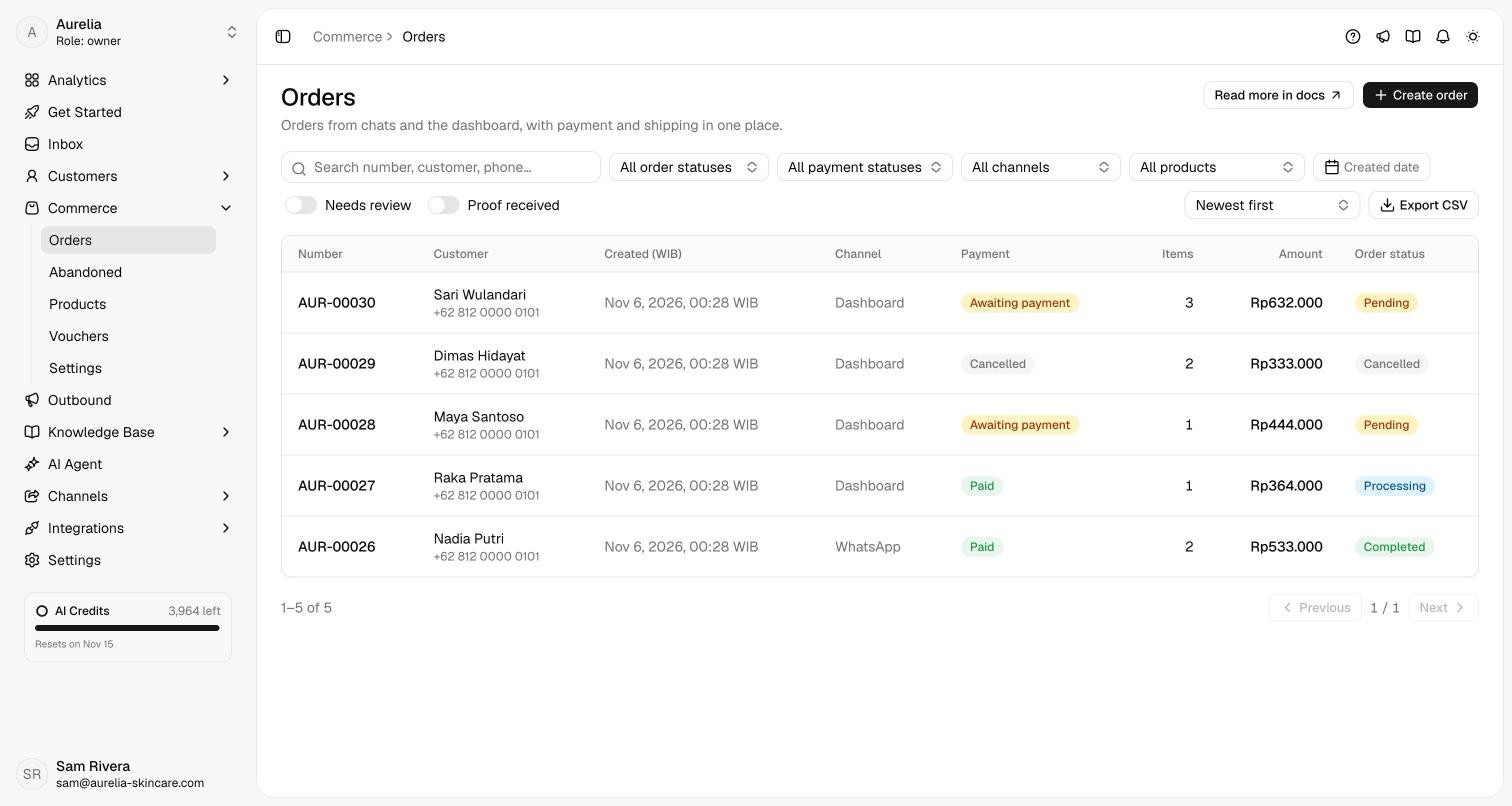
Commerce lets your AI agent and your team take orders inside the conversation. You keep a product catalog in Asks, choose how customers pay (a Xendit payment link, a manual bank transfer, or both) and set the shipping fees you charge. The agent quotes real prices, stock and shipping fees, confirms an order summary with the customer, creates the order and sends the payment link. The payment confirmation arrives in the same conversation, and every order lands on the Orders page, where your team ships it.
Amounts are whole rupiah (IDR), and every commerce time is shown in WIB.
Availability — Commerce is for Indonesian workspaces that don't sell through Shopify. It's included in every paid plan and the trial, not the Free plan. It's rolling out: for now, Asks turns it on workspace by workspace. Once it's on, Commerce appears in the dashboard sidebar with Orders, Products, Vouchers and Settings. Shopify stores keep Shopify checkout, where the agent works with your Shopify store instead.
How it fits together
- Products: your catalog, with variants, prices, stock, images and weight. The agent sells only what's in it, at these prices.
- Abandoned orders: one reminder in the chat when a customer goes quiet on an order, and the agent picks it back up if they reply.
- Payments & settings: Xendit payment links that confirm themselves when the customer pays, money going straight to your own Xendit account; and manual bank transfer, which your team marks paid after checking the customer's payment proof.
- Shipping: your own flat or per-province rates, store pickup, and live courier rates (instant couriers too) from up to five pickup addresses.
- Orders: one list for every order, with payment, fulfilment and a timeline per order, and how much of your sales the AI agent closed.
- Orders in chat: how the agent takes an order, and how your team creates one from a conversation in the Inbox.
- Customers & addresses: every order belongs to a customer, whose delivery addresses are saved for next time; pick an address on a map or from a location the customer shares.
- Vouchers, invoices & receipts, edits and refunds, and reminders & alerts for unpaid orders, new orders and low stock.
An order becomes paid only when Xendit's verified notification arrives or when an owner or admin marks a bank transfer as received. A customer writing "sudah transfer" never marks an order paid.
Set up Commerce
Go to Commerce → Settings and connect Xendit under Online payments, turn on Offer manual transfer with at least one account under Bank transfer, or both. Until one is set up, the agent doesn't take orders and the Create order page can't submit. See Payments & settings.
Go to Commerce → Products and click Add product, or Import CSV to bring in a catalog at once. See Products.
Under Delivery rates, add your rates, a store pickup option and live courier rates, under Pickup addresses add where couriers collect your orders, or turn off Require shipping on every order if you sell digital goods. See Shipping.
Under Order rules, set the Order number prefix and how long a payment link stays valid. Let the AI agent create orders and the payment reminder are on by default. Under Invoices & receipts, add the business details your invoices and receipts show.
Verify it works — in the Playground, ask for one of your products and say you want to order it. The agent finds it in your catalog and prepares an order summary with the shipping fee and total; creating the order is simulated there. For a full run, connect Xendit with a development key (Test mode), order through your website chat, and complete the payment in Xendit's test environment: the order turns Paid and the chat gets the payment confirmation.
Roles
| Action | Owner and Admin | Member |
|---|---|---|
| See orders, products, vouchers and settings; export CSV | Yes | Yes |
| Create, edit (while unpaid), ship and cancel orders; create a new payment link | Yes | Yes |
| Attach a payment proof; open and share invoices and receipts | Yes | Yes |
| Add customers and edit their saved addresses | Yes | Yes |
| Mark a bank-transfer order as paid, reject a payment proof, resolve a review | Yes | No |
| Record a refund | Yes | No |
| Add, edit, import and archive products | Yes | No |
| Create, edit and delete vouchers | Yes | No |
| Change Commerce settings (payments, shipping, orders, reminders, invoices), connect Xendit | Yes | No |
Plans
Commerce is part of every paid plan and the trial (Limits & quotas); in a workspace with Commerce, each paid plan on the subscription page lists Commerce: orders, products, payment links. If the workspace moves to a plan without it, existing orders and products stay visible and keep updating: payments are still recorded, and your team can ship and complete orders. Creating products, orders, vouchers and payment links, editing orders, and connecting Xendit are locked until you upgrade, and the agent stops taking orders.
API, webhooks and MCP
The public API Business and up has the same catalog and orders, in workspaces with Commerce. The full reference is under Commerce API.
| Endpoint | Scope | What it does |
|---|---|---|
GET /v1/products, GET /v1/products/{id} | products:read | The catalog with variants, prices, SKUs and stock. |
GET /v1/orders, GET /v1/orders/{id} | orders:read | Orders with items, totals, the current payment, the voucher, refunds, the payment-proof state and the invoice link; ?include=timeline adds the event log. |
POST /v1/orders | orders:write | Creates a real order: reserves stock and creates the Xendit link or bank-transfer request; voucher_code applies a voucher. Send an Idempotency-Key so a retry never creates a second order. It doesn't message the customer. |
Six order.* webhook events report each order moment, and the MCP server adds five tools for products and orders. Elsewhere these endpoints answer 404 with the code COMMERCE_UNAVAILABLE. Voucher codes aren't readable through the API.
Related
- Orders in chat: what the agent does and what the customer sees.
- Customers & addresses: who each order belongs to, and their saved addresses.
- Escalation & handoff: paid-order changes and refunds go to your team.
- Limits & quotas: which plans include Commerce.