Webhooks
Webhooks
Receive Asks events on your server in real time — event types, signed deliveries, verification, and retries.
Webhooks Business and up push events to your server as they happen — a new message, an escalation, a captured lead — so you can react without polling. Deliveries are signed, retried on failure, and logged so you can inspect and replay them.
Create an endpoint
Go to app.asks.app/integrations/webhooks and select Add Endpoint. Only workspace owners and admins can manage endpoints.
Enter the Endpoint URL (HTTPS only) and an optional description. Keep All events checked, or uncheck it and tick the events you want — the list is every event type below.
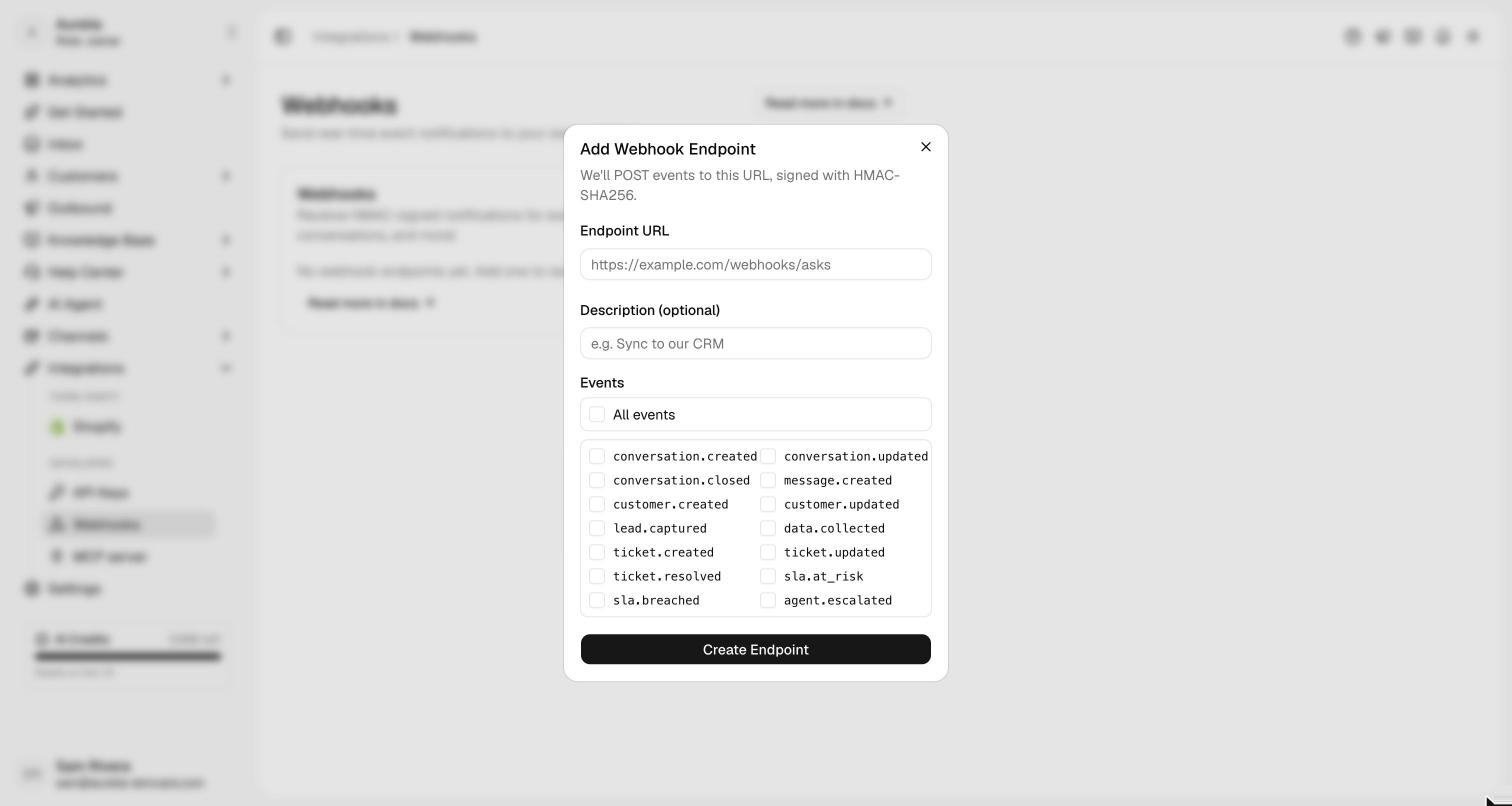
Select Create Endpoint. The Signing Secret (whsec_…) is shown once — store it where your server can read it.
You can also create endpoints with the API, using the webhooks:manage scope:
curl https://api.asks.app/v1/webhook_endpoints \
  -H "Authorization: Bearer $ASKS_API_KEY" \
  -H "Content-Type: application/json" \
  -d '{
    "url": "https://example.com/asks/webhooks",
    "enabled_events": ["lead.captured", "data.collected", "agent.escalated"]
  }'
The response includes the signing secret (whsec_…) exactly once — store it securely. The URL must be HTTPS and is validated against internal, loopback, and metadata addresses at registration and again at every delivery.
Event types
Subscribe to specific events, or ["*"] for all:
| Event | Fires when |
|---|---|
conversation.created | A conversation is created. |
conversation.updated | A conversation changes (status, assignment, …). |
conversation.closed | A conversation is closed. |
message.created | A message is added to a conversation. |
customer.created | A customer is created. |
customer.updated | A customer is updated. |
lead.captured | A lead's contact details are captured — by the agent in conversation or through a Collect Leads form. |
data.collected | A Collect Data action is completed. |
ticket.created | A ticket is created. |
ticket.updated | A ticket is updated. |
ticket.resolved | A ticket is resolved. |
sla.at_risk | A ticket approaches an SLA target. |
sla.breached | A ticket misses an SLA target. |
agent.escalated | The AI agent escalates to a human. |
order.created | A Commerce order is created — by the AI agent, a team member or the API. |
order.paid | An order's payment is confirmed: a verified Xendit notification, a check with Xendit, or a bank transfer marked paid. |
order.payment_expired | An order's payment link expired unpaid; its reserved stock was released. |
order.cancelled | An order is cancelled. |
order.updated | An order's status or tracking number changes, a new payment link replaces an expired one, the unpaid order is edited, a payment proof is received or rejected, or a refund is recorded. |
order.needs_review | A payment needs a person: the amount didn't match, the order was paid twice, or it was paid after it was cancelled. |
data.collected carries submissionId, actionId, actionName, conversationId, customerId, channel, source (form or conversation), the collected data as field–value pairs, and completedAt. lead.captured carries the updated customer with the captured fields — or, when a lead form only repeats details already on record, the same submission shape as data.collected without the action fields.
The sla.* events fire when SLA tracking is enabled for the workspace. Their data is the ticket resource plus two extra fields: sla_metric (first_response, next_response, or resolution) and sla_due_at (the target that was at risk or missed).
The order.* events fire only in workspaces with Commerce (Indonesian stores that don't use Shopify). Their data is the order as GET /v1/orders returns it when the event fires, plus extra fields: payment_channel and payment_source (webhook, reconcile or manual) on order.paid; review_reason (amount_mismatch, double_payment or paid_after_cancel) and, for an amount mismatch, paid_amount on order.needs_review; and changes on order.updated: status_changed, tracking_updated, payment_renewed, edited (with the old and new totals), payment_proof_received, payment_proof_rejected (with the reason) or refund_recorded (with the amount and the new payment status). Amounts are whole rupiah.
The endpoint's Send test event button in the dashboard (or POST /webhook_endpoints/{id}/test) sends a synthetic ping event.
Deliveries
Events arrive as a POST with a JSON envelope; data carries the event's payload (for message.created, a message object shaped like the REST resource):
{
  "id": "cmc1a2b3…",
  "type": "message.created",
  "created_at": "2026-07-06T12:00:00.000Z",
  "data": { "object": "message", "id": "cmc1a2b4…" }
}| Header | Value |
|---|---|
Asks-Signature | t=<unix>,v1=<hmac> — verify this (below). |
Asks-Event-Id | The event id (matches id in the body). |
Asks-Event-Type | The event type. |
Asks-Webhook-Id | The delivery id. |
User-Agent | Asks-Webhooks/1.0 |
Respond with any 2xx within 10 seconds to acknowledge. Anything else counts as a failure.
Verify the signature
The Asks-Signature header is Stripe-style: t=<unix timestamp>,v1=<hex HMAC>, where the HMAC is HMAC-SHA256(secret, "{t}.{raw body}"). Verify against the raw request body and reject deliveries older than 300 seconds:
import { createHmac, timingSafeEqual } from "node:crypto";

export function verifyAsksSignature(rawBody, header, secret, tolerance = 300) {
  const parts = Object.fromEntries(
    header.split(",").map((kv) => kv.split("=")),
  );
  const t = Number(parts.t);
  if (!t || !parts.v1) return false;
  if (Math.abs(Date.now() / 1000 - t) > tolerance) return false;

  const expected = createHmac("sha256", secret)
    .update(`${t}.${rawBody}`)
    .digest("hex");
  const a = Buffer.from(parts.v1, "hex");
  const b = Buffer.from(expected, "hex");
  return a.length === b.length && timingSafeEqual(a, b);
}
Compute the HMAC over the exact raw body bytes. Parsing and re-serializing the JSON changes the bytes and breaks verification — read the raw body before your framework's JSON middleware touches it.
Retries and auto-disable
- Failed deliveries retry with exponential backoff starting at 1 minute — up to 8 attempts per delivery.
- After 15 consecutive failed deliveries, the endpoint is automatically disabled and the workspace's owners and admins are notified by email. Re-enable it with the endpoint's switch in the dashboard, or with
PATCH /webhook_endpoints/{id}and"status": "enabled"— either way the failure counter resets. - The endpoint's View deliveries button shows the last 20 attempts with their HTTP status. Through the API, list them with
GET /webhook_endpoints/{id}/deliveriesand replay one withPOST /webhook_endpoints/{id}/deliveries/{deliveryId}/retry.
Roll the secret
If a signing secret leaks, the endpoint's Roll signing secret button (or POST /webhook_endpoints/{id}/roll_secret) generates a new one, shown once. The old secret stops working immediately, so update your verifier in the same deploy.
Event log
An event is recorded whenever at least one enabled endpoint subscribes to its type — whether or not the delivery succeeded. Events no endpoint listens for are not stored. Browse the log with GET /events. All management endpoints are documented in the Webhook endpoints reference.