Widget developer guide
Widget developer guide
Embed script attributes, the JavaScript API, identity verification for logged-in users, SPA and framework installs, and CSP for the Asks widget.
This page covers the widget from the developer's side — the embed script, its attributes, the JavaScript API, and how it behaves inside your page. For setup and appearance, see Chat widget, Spotlight, and Widget customization.
The embed script
The Deploy tab of the Chat widget (app.asks.app/channels/widget/deploy) generates your snippet:
<script
  src="https://cdn.asks.app/embed.js"
  data-widget-key="YOUR_WIDGET_KEY"
  async
></script>
The script auto-initializes when it finds a data-widget-key, mounts the widget in a Shadow DOM (your page's CSS can't leak in, and the widget's can't leak out), and talks to api.asks.app. One snippet serves whichever website channel is live: the Chat widget's floating launcher, or the Spotlight pill. The widget key is public by design — it identifies your widget, it doesn't authenticate anyone.
Supported attributes
data-widget-keystringrequiredYour widget key. Without it the script does nothing.
data-container-idstringMounts the widget inline into the element with this id instead of a floating launcher. You control the container's size:
<div id="asks-widget-embedded" style="width:100%;height:600px;"></div>
<script src="https://cdn.asks.app/embed.js" data-widget-key="YOUR_WIDGET_KEY" data-container-id="asks-widget-embedded" async></script>
data-user-id / data-user-hashstringA logged-in user's stable id and its signature from your server. Together they give the user verified, cross-device conversation history — see Logged-in users.
data-customer-email / data-customer-name / data-shopify-customer-idstringOptional details about the visitor, forwarded when a conversation starts so the customer record matches. On their own they are personalization hints only — the backend never treats them as authentication.
Open the widget from your page
Add data-asks-open to any button or link and a click opens the widget — the Chat widget panel or Spotlight, whichever is live. It works for elements added after page load too:
<button data-asks-open>Chat with us</button>Or open and close it from your own code:
window.AsksWidget.open();
window.AsksWidget.close();
Both are no-ops until the widget has mounted. window.AsksWidget.version returns the build identifier of the loaded script — include it when reporting a widget issue.
Logged-in users
Without identity, visitors chat anonymously and their conversations live in a first-party cookie in that browser. If your site has logins, sign each user's id on your server and the widget gives them the same conversation history on every device and browser — and nobody can impersonate them.
On the Chat widget's Deploy tab, find Identity verification (for users with logins) and select Reveal identity secret. Store it as a server-side secret.
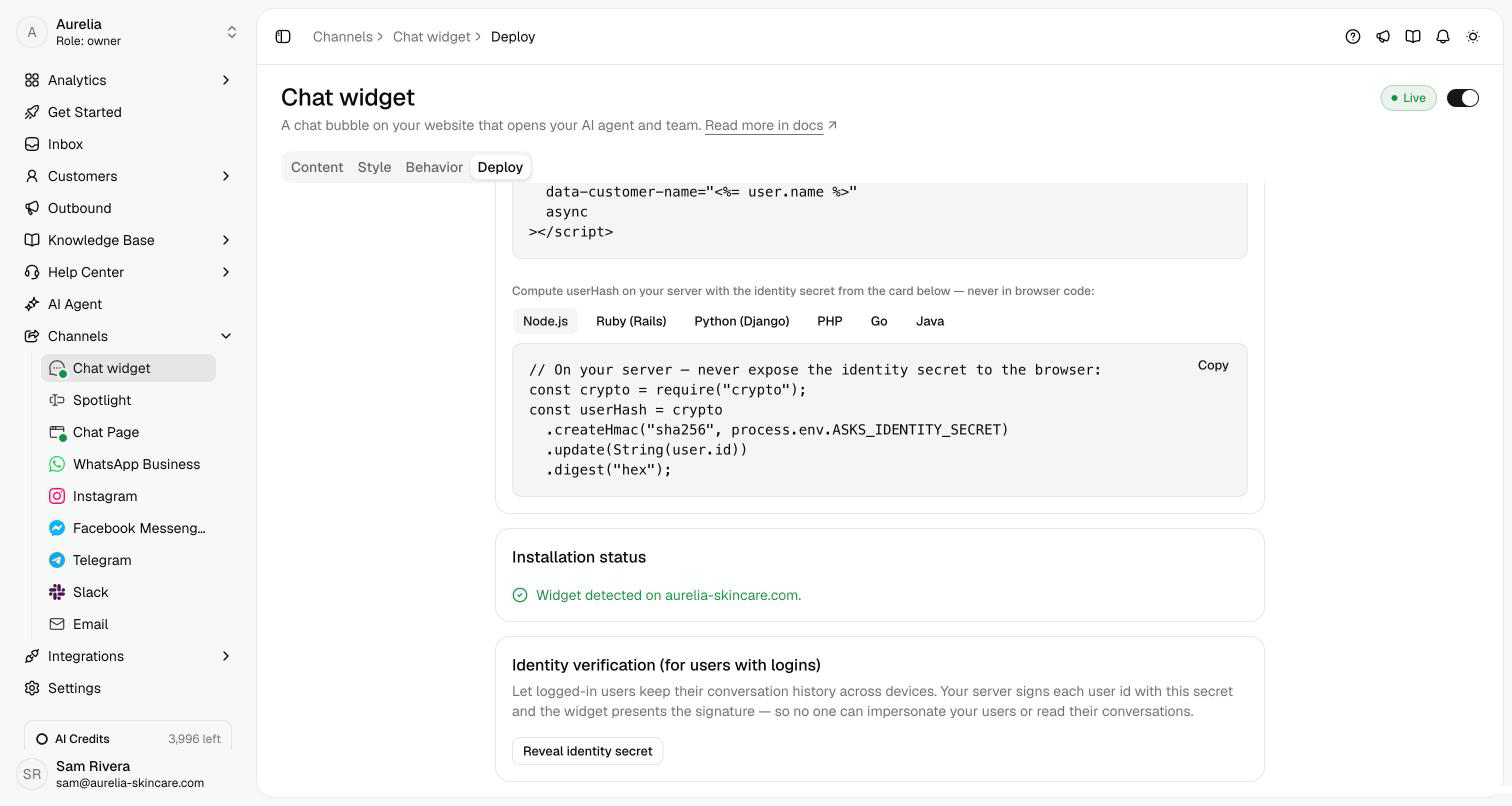
userHash is the hex HMAC-SHA256 of the user id, keyed with the identity secret. The Deploy tab shows the same code for Ruby, Python, PHP, Go, and Java.
// Node.js, on your server
const crypto = require("crypto");
const userHash = crypto
  .createHmac("sha256", process.env.ASKS_IDENTITY_SECRET)
  .update(String(user.id))
.digest("hex");Render data-user-id, data-user-hash, data-customer-email and data-customer-name on the script tag — or, in a single-page app where login happens without a page load, call identify after login and identify(null) on logout:
window.AsksWidget.identify({
  userId: user.id,
  userHash: asksUserHash, // fetched from your server
  email: user.email,
  name: user.name,
});

window.AsksWidget.identify(null); // on logout
Verification is always on: when a user id is present, a missing or wrong userHash is rejected rather than treated as anonymous. Use Check a userHash on the Deploy tab to test a hash your server produced — it runs in your browser and sends nothing.
Never put the identity secret in browser code. Rotate secret on the Deploy tab invalidates every issued userHash at once — logged-in users fall back to anonymous chat until your server signs with the new secret.
React, Vue, and Angular
For module-bundled apps, install the @asksdotapp/widget-js package. It loads the hosted embed.js once, so you always run the latest widget:
npm install @asksdotapp/widget-jsimport Asks from "@asksdotapp/widget-js";
// In a shared layout or root component — repeated calls are ignored.
Asks({
widgetKey: "YOUR_WIDGET_KEY",
userId: user.id, // optional: logged-in users
userHash: user.asksHash, // minted on your server
email: user.email,
name: user.name,
});The package also exports show(), hide(), identify(identity), and shutdown() (the same as identify(null), for logout). Every call is safe before the widget finishes loading, and a no-op during server-side rendering.
Single-page apps
Load the widget once — the script in your root HTML or root layout, or the package's Asks() in a shared layout — not per route. The widget survives client-side navigation on its own, and window.AsksWidget.init is idempotent: re-running it clears and remounts rather than duplicating.
Don't render the script tag inside a component that unmounts on navigation. Each remount tears down the widget and the visitor's open conversation UI state with it.
The global also exposes init for cases where you can't set attributes — it takes widgetKey, containerId or targetSelector (a CSS selector) for inline mode, and an identity object with the fields above.
Sessions
There is nothing to implement. When a visitor starts or resumes a conversation, the backend issues a signed session token bound to that workspace, conversation, and customer; the widget presents it on subsequent calls. Tampering with conversation or customer ids breaks the signature and the request is rejected. You never handle credentials, and the email and name hints stay untrusted unless the user is verified with userHash.
Content-Security-Policy
If your site enforces a strict CSP, allow:
| Directive | Value | Why |
|---|---|---|
script-src | https://cdn.asks.app | The embed.js bundle. |
connect-src | https://api.asks.app wss://api.asks.app | All widget API traffic, plus the live-messaging socket (wss:). Without the socket origin, replies still arrive but only on refresh — no live updates or typing indicators. |
img-src | https://cdn.asks.app https://storage.googleapis.com | Uploaded media: your workspace logo and launcher icon, agent avatars, and image attachments in conversations. Media serves from our CDN (cdn.asks.app), with storage.googleapis.com as the fallback origin — allow both. |
media-src | https://cdn.asks.app https://storage.googleapis.com | Audio/video attachments in conversations. |
frame-src | https://storage.googleapis.com | The inline PDF preview's browser-viewer fallback. |
font-src | data: | The widget's font is inlined as a data: URI. |
Styles live inside the widget's Shadow DOM, so no external stylesheet origin is needed. The font is registered through a small inline <style> tag in your document head — if your style-src bans inline styles, the widget still works and falls back to system fonts. If your agent sends images in replies from other origins (e.g. your own product pages), those origins also need to pass your img-src.
Troubleshooting
Open the browser console — the widget logs under an [asks-widget] prefix.
The widget doesn't show
- Wrong key — the config request returns
404 Widget not found. Re-copy the snippet from the Deploy tab. - Widget not live — the config request returns
400 Widget is not active. Turn on Live for the Chat widget or Spotlight in the dashboard.
Inline mode renders nothing
The container element must exist before the script runs. If it doesn't, the console shows Inline container not found and the widget skips mounting — move the script after the div, or keep async and ensure the div is in the initial HTML.
A logged-in user gets an error or loses their history
The userHash doesn't match. Paste the user id and hash into Check a userHash on the Deploy tab, and make sure your server hashes the exact user id string with the current identity secret.
The launcher is hidden behind my UI
The floating host uses the maximum z-index (2147483647) inside its own fixed-position host element. If it's still obscured, check for ancestor stacking contexts created by your own transform or filter styles on body.