MCP server
MCP server
Connect Claude, ChatGPT, Codex, Cursor and other MCP clients to your Asks workspace over OAuth.
The Asks MCP server Business and up lets an AI assistant work directly with your Asks workspace. It can chat with your AI agent, manage the knowledge it's trained on, search and work the inbox, handle tickets and customers, and read your analytics — without you copying data between tools.
It is a remote Model Context Protocol server. There is nothing to install or host.
Endpoint — https://api.asks.app/v1/mcp
Sign-in — OAuth: the assistant opens Asks, you choose the workspace and approve exactly what it can do. No API key to create or paste.
The endpoint isn't a page to open in your browser. Add it to an MCP client and the client opens the sign-in page for you. This is the opposite direction of MCP servers for your agent, where your Asks agent uses other MCP servers as tools.
You'll find the URL, per-client setup and the apps you've connected under Integrations → MCP server (app.asks.app/integrations/mcp).
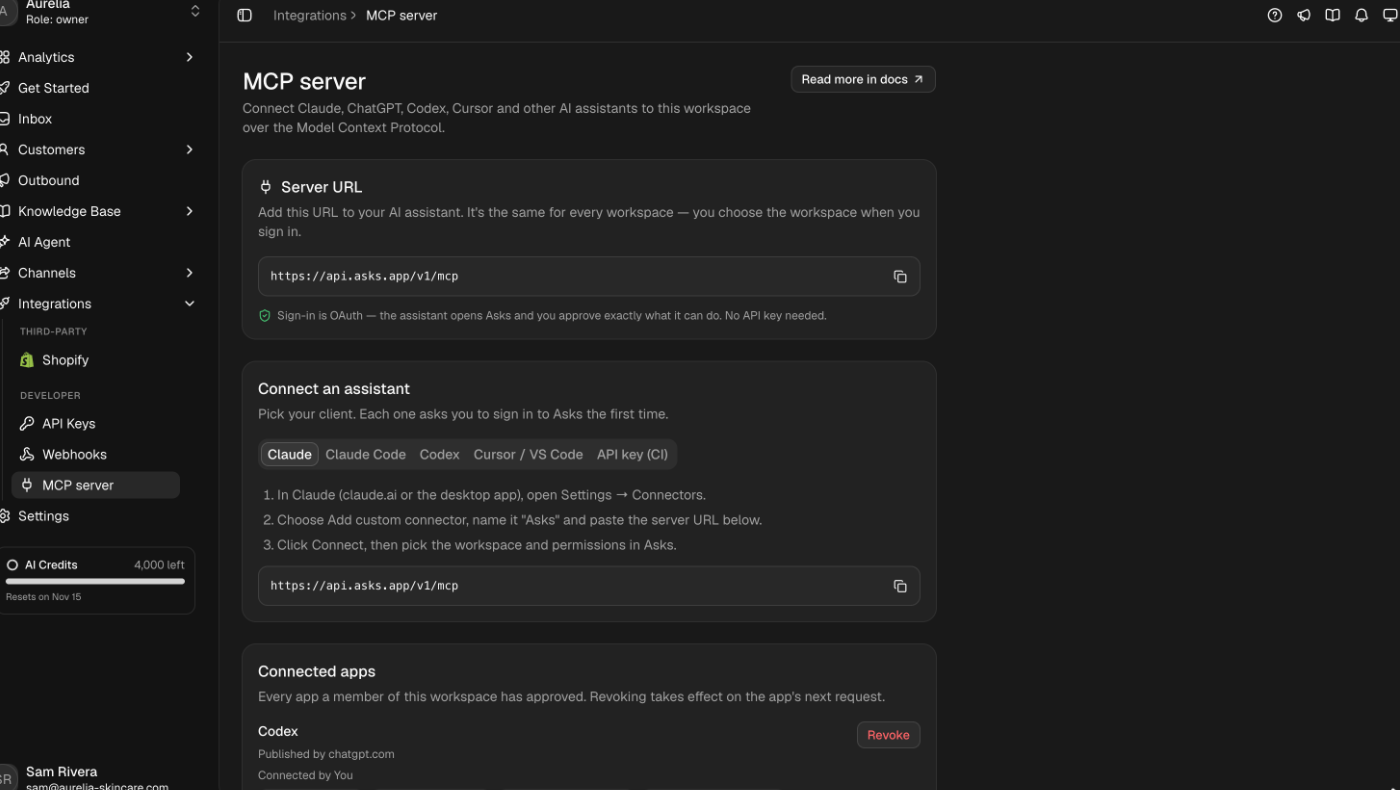
Connect an assistant
In Claude.ai or the Claude desktop app, open Settings → Connectors → Add custom connector, name it Asks and paste https://api.asks.app/v1/mcp. Claude opens the Asks sign-in; approve access and the tools appear in your chats.
How sign-in works
The first time a client connects it identifies itself to Asks automatically — Claude with its published client identity, other clients through Dynamic Client Registration. You don't create anything in advance.
Asks shows a consent screen with the app's name, where access goes (for a desktop tool, "an app on this computer"), the workspace picker and exactly which permissions the app asked for. Choose the workspace and allow or cancel.
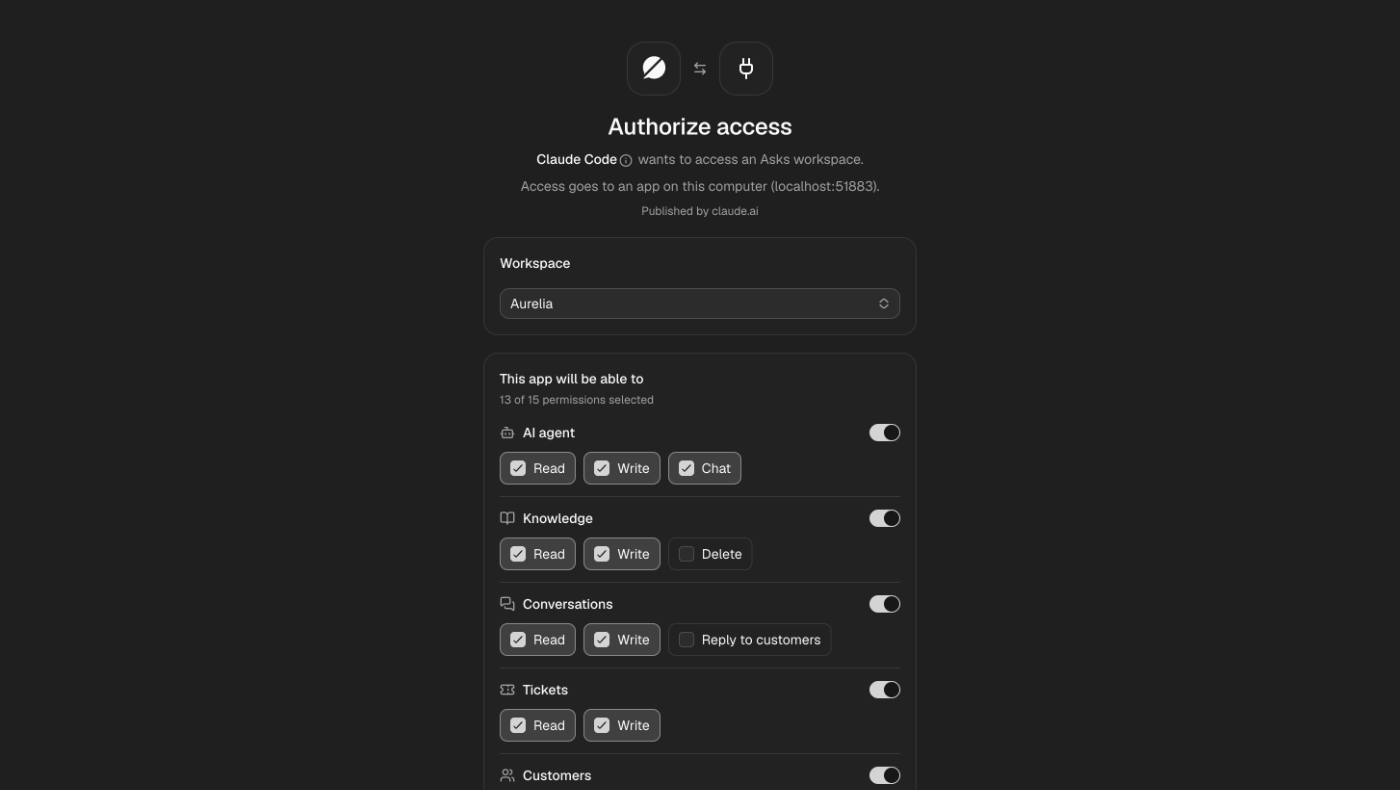
Access is granted to that one app, for that one workspace, limited to what you approved and never more than your own role allows.
| Access token | Expires after 1 hour; the client refreshes it silently |
| Approval | Expires after 90 days; the app asks again |
| Revocation | Takes effect on the app's next request |
Permissions
Permissions follow the public API's scopes, grouped by area. An app requests a set; on the consent screen you choose which to approve.
| Area | Read | Write | Opt-in |
|---|---|---|---|
| AI agent | agent:read | agent:write, agent:chat | — |
| Knowledge | knowledge_base:read | knowledge_base:write | knowledge_base:delete |
| Conversations | conversations:read | conversations:write | messages:write (reply to customers) |
| Tickets | tickets:read | tickets:write | — |
| Customers | customers:read | customers:write | — |
| Orders & products | products:read, orders:read | orders:write | All three |
| Workspace | channels:read, analytics:read | — | — |
Opt-in permissions are shown but not selected by default — approve them only when the app genuinely needs to delete knowledge, message your customers, or work with your orders. Orders & products is offered only in workspaces with Commerce, and all three are opt-in: orders carry customers' contact details and addresses, and orders:write creates real orders with live payment links. agent:write (changing the live agent) is available to owners and admins only. If a member's role changes, their apps change with it on the next request.
An app only sees the tools its permissions cover. A short tool list usually means a narrow approval, not a missing feature — ask the assistant to run asks_whoami.
What the assistant can do
27 tools, each one running a single public API operation — 32 in workspaces with Commerce.
Read and update the agent's settings, search the knowledge it retrieves from, and chat with it.
asks_get_agent · asks_update_agent · asks_chat · asks_search_knowledge
Add, edit, re-crawl and remove what the agent learns from — text, Q&A and websites. Every change trains immediately.
asks_list_sources · asks_get_source · asks_get_sources_summary · asks_create_source · asks_update_source · asks_delete_source · asks_sync_source
Search every channel's conversations, read them with notes, close, assign or hand back to the AI, add internal notes and reply to the customer.
asks_search_conversations · asks_get_conversation · asks_update_conversation · asks_add_note · asks_send_reply · asks_list_tags
Work tickets and teams, look up and update customers, check channels and pull analytics.
asks_list_tickets · asks_get_ticket · asks_update_ticket · asks_list_teams · asks_search_customers · asks_get_customer · asks_update_customer · asks_list_channels · asks_get_analytics · asks_whoami
With Commerce: read the catalog and orders, and create an order with its payment link.
asks_list_products · asks_get_product · asks_list_orders · asks_get_order · asks_create_order
Tool reference
- Read returns data and changes nothing.
- Write creates or changes data in your workspace.
- Sensitive reaches a real customer or can't be undone. A well-behaved client asks you before every call. For
asks_send_replyandasks_delete_source, Asks enforces it: the assistant must pass an explicit confirmation, or the server answersCONFIRMATION_REQUIREDand runs nothing.
| Tool | Permission | Type | Side effects |
|---|---|---|---|
asks_whoami | Always available | Read | — |
asks_get_agent | agent:read | Read | — |
asks_update_agent | agent:write | Write | Changes the live agent — every channel's next reply uses it. |
asks_chat | agent:chat | Write | A real conversation on the API channel: uses AI credits and appears in your inbox. Needs the Premium plan and the API channel on. |
asks_search_knowledge | agent:read | Read | — |
asks_list_sources · asks_get_source · asks_get_sources_summary | knowledge_base:read | Read | — |
asks_create_source | knowledge_base:write | Write | Adds text, Q&A or a website and starts training. Counts toward your plan's knowledge limits. |
asks_sync_source | knowledge_base:write | Write | Re-crawls a website in the background. |
asks_update_source | knowledge_base:write | Sensitive | Overwrites the content and retrains; the previous text is gone. |
asks_delete_source | knowledge_base:delete | Sensitive | Removes the source and what the agent learned from it. Can't be undone. |
asks_search_conversations · asks_get_conversation · asks_list_tags | conversations:read | Read | — |
asks_update_conversation | conversations:write | Write | Closing runs your normal close (ticket, note, webhooks); assigning a member takes the conversation over from the AI, "ai" hands it back. |
asks_add_note | conversations:write | Write | Internal note — never sent to the customer. |
asks_send_reply | messages:write | Sensitive | Sends the message to the customer on their channel, as you. Can't be unsent; check delivery.status. |
asks_list_tickets · asks_get_ticket · asks_list_teams | tickets:read | Read | — |
asks_update_ticket | tickets:write | Write | Closing closes the conversation and can email the customer that it was resolved. |
asks_search_customers · asks_get_customer | customers:read | Read | — |
asks_update_customer | customers:write | Write | — |
asks_list_channels | channels:read | Read | — |
asks_get_analytics | analytics:read | Read | — |
asks_list_products · asks_get_product | products:read | Read | — |
asks_list_orders · asks_get_order | orders:read | Read | — |
asks_create_order | orders:write | Write | Creates a real order: reserves stock and creates a live Xendit payment link or bank-transfer request; voucher_code applies a voucher. It doesn't message the customer; sharing the link is a separate asks_send_reply. Pass an idempotency_key so a retry can't create a second order. |
Limits
- The workspace needs the Business plan or higher;
asks_chatneeds Premium. On other plans every tool exceptasks_whoamireturnsPLAN_REQUIRED. - Requests share the public API's rate limits: per connection and per workspace, every minute.
- Lists are paginated: follow
next_cursorwhilehas_moreis true. A full-text conversation search returns one ranked page. - Responses don't stream:
asks_chatreturns the complete reply.
Errors
A failed tool call returns a tool error whose text starts with a code, for example NOT_FOUND: Conversation not found. The codes follow the public API's errors: VALIDATION_ERROR, NOT_FOUND, CONFLICT, INSUFFICIENT_SCOPE, PLAN_REQUIRED, PLAN_LIMIT_REACHED, INTERNAL_ERROR — plus CONFIRMATION_REQUIRED when a sensitive tool was called without confirmation, and for the Commerce tools COMMERCE_UNAVAILABLE, COMMERCE_OUT_OF_STOCK and COMMERCE_PAYMENT_UNAVAILABLE.
Two errors come from the endpoint itself, before any tool runs:
| Status | Code | Meaning |
|---|---|---|
| 401 | AUTH_INVALID_TOKEN | The token is missing, expired or revoked. The WWW-Authenticate header points the client to sign-in. |
| 429 | RATE_LIMIT_TOO_MANY_REQUESTS | The connection went over its rate limit. Retry after the seconds in Retry-After. |
Manage connected apps
Every app you approve appears under Integrations → MCP server → Connected apps, with who connected it, what it can access and when it was last used. Owners and admins see every member's apps; members see their own.
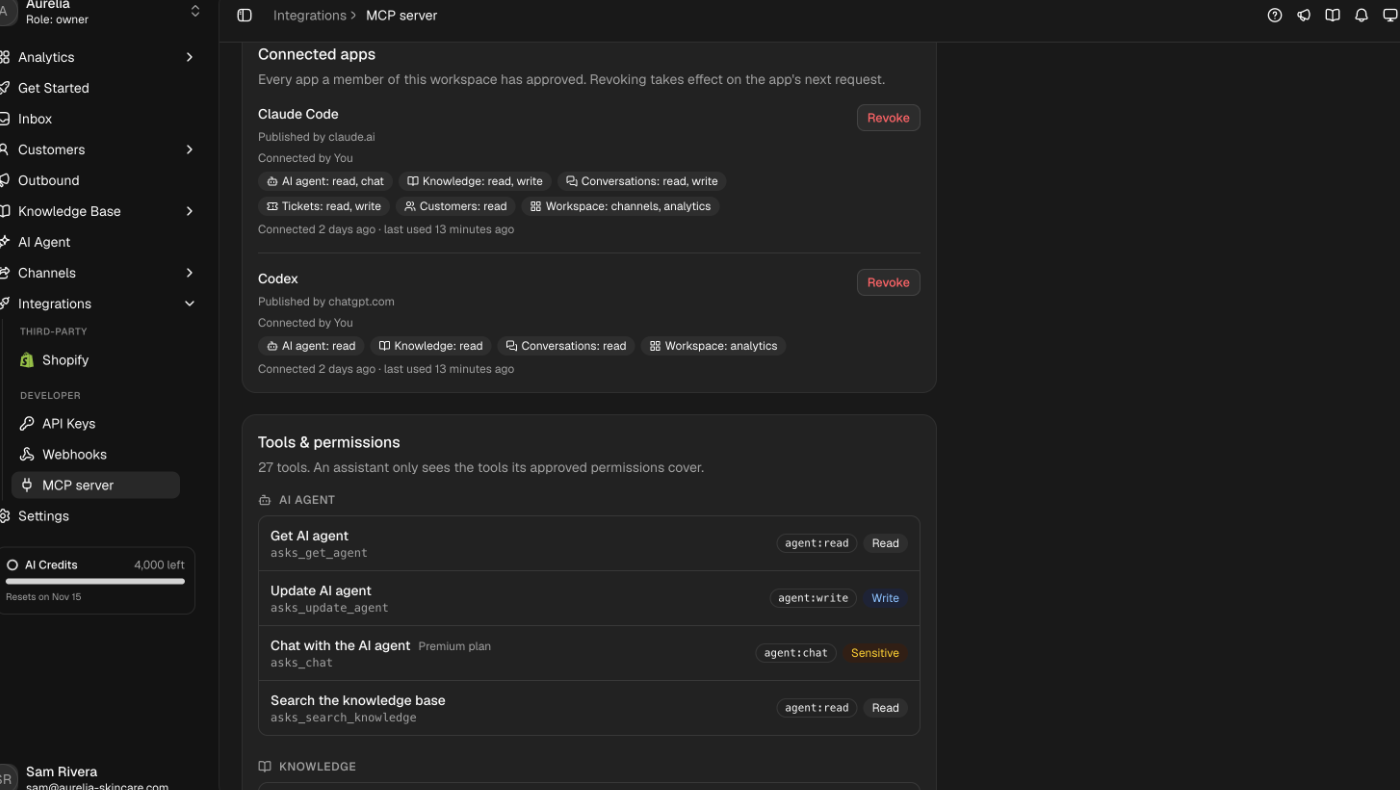
Select Revoke to cut off access. It takes effect on the app's very next request, even if its current token hasn't expired, and the app needs your approval again to reconnect. Disconnecting inside the assistant (for example, removing the connector in Claude) only makes it forget the token — revoke in Asks to end the approval.
An app's name is chosen by the app itself when it registers and can't be verified. Treat it as a label, not proof of identity, and revoke anything you don't recognize.
Troubleshooting
The client says the server needs authentication. Expected before you sign in. Run the client's sign-in step (/mcp in Claude Code, codex mcp login asks in Codex) and approve the consent screen.
A tool the assistant needs is missing. The approval was narrower than the task. Ask the assistant to run asks_whoami, then revoke the app under Connected apps and reconnect, approving what it needs. A permission that's greyed out on the consent screen needs an owner or admin.
A knowledge source isn't live yet. Sources train as soon as they're written, in the background. A new source reports training (a website syncing) until it's trained, or failed. Ask the assistant to re-read the source.
asks_chat returns CONFLICT. The AI agent is off or not deployed on the API channel — turn on the API channel in AI Agent → Deploy. PLAN_LIMIT_REACHED instead means the workspace is below Premium or out of AI credits.