Playground
Playground
Chat with your agent on your live configuration before customers do, then keep what you checked as tests.
Before the agent talks to customers, talk to it yourself. The Playground runs the same pipeline as production — knowledge retrieval, custom actions, MCP tools, escalation rules — on your live configuration, so what you see is what customers get. The one difference is safety: lookups run for real, but actions that change data — a custom action that uses POST, PUT, PATCH, or DELETE, a Calendly booking, a saved lead or data submission, a Commerce order — are simulated. Tools from connected MCP servers are not simulated, so test MCP tools that change data with care.
Once the agent behaves the way you want, turn what you checked by hand into tests: a simulated customer has the conversation again every time you change your agent, and a judge tells you whether it still passes.
The Playground
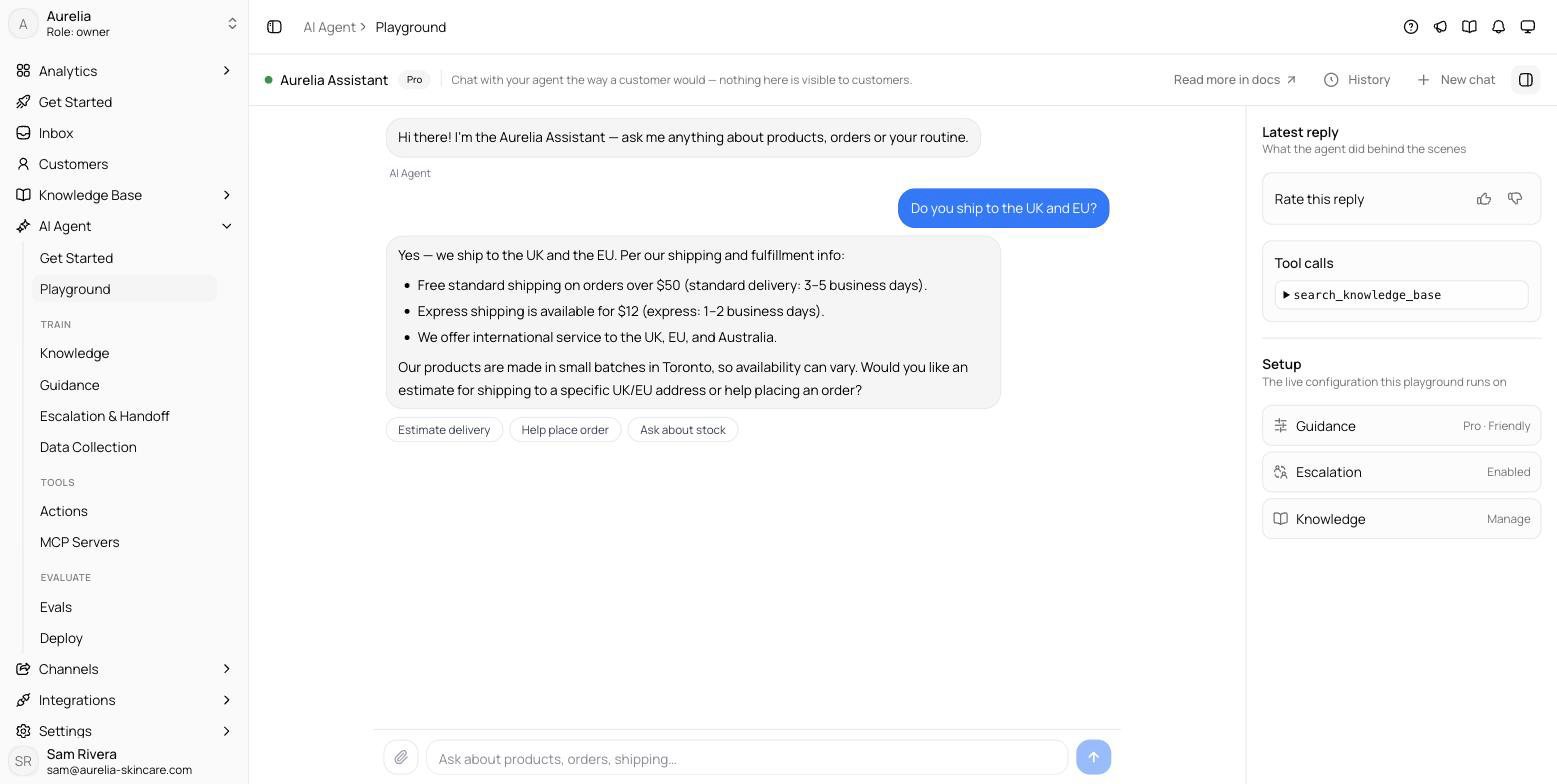
Open app.asks.app/ai-agent/playground and start a conversation. It's laid out like your Inbox, so a conversation reads exactly like a real one. Only your team sees Playground conversations, and Playground replies don't use AI credits.
- Conversations list — every Playground conversation in the workspace, newest first, named after its opening message. Search them, flip Mine to see only your own, and right-click one to delete it. New test (the + button) starts a fresh one.
- The thread — you write as the customer and the agent answers on the right, just as replies appear in the Inbox: product cards, links, quick replies (click one on the latest reply to send it), and the sources it cited. While a reply is being written you see live progress, and when the agent would hand off to your team the thread marks it and the header shows Needs human. Attach images or documents from the composer, or drop them onto the thread.
- Details panel — what the agent did behind the scenes: the reply's outcome, a thumbs up/down, every tool call with expandable arguments and results, the sources cited, and Agent setup (model, tone, response length, escalation, knowledge). Toggle it from the thread header.
- Save as test — turns the conversation into a test: a draft with a simulated customer, the opening message and one success criterion opens in the test editor for you to review.
Tests
Paid plans Once a conversation goes the way you want, keep it: Save as test turns it into a test, where a simulated customer has the conversation again whenever you change your agent and a judge grades it against one success criterion. Tests run on your live configuration like the Playground, but they repeat — 1 to 20 times per run — so you see a pass rate and whether a change flipped a result, and they never touch your Inbox, analytics or AI credits.
What the agent understands
The Playground, tests and every channel share the same input handling, so you can test these directly:
- Images — the agent sees image attachments and can answer about them (a screenshot of an error, a photo of a product).
- Voice notes — audio attachments up to 25 MB are transcribed and treated as the customer's message.
- Documents — PDFs and similar files are read as part of the conversation.
- Any language — the agent detects the language of the customer's latest message and replies in it, translating your templates and instructions as needed. No configuration required.
Once the agent passes your tests, enable it on real channels from the deploy page.