Telegram
Telegram
Connect your own Telegram bot — your AI agent answers customers in direct messages, and your team takes over from the Inbox.
The Telegram channel connects a bot you own to your workspace. Customers message the bot in a private chat, your AI agent answers right there, and every conversation lands in your Inbox, where your team can step in at any time. Replies always go out as the bot.
You can connect several bots, for example one per brand or region. Each bot is its own channel.
Prerequisites
- A Telegram account, to create the bot in @BotFather, Telegram's official bot for creating bots.
- The Owner or Admin role in your Asks workspace.
Connect Telegram
Go to app.asks.app/channels/telegram. The Connect a Telegram bot card walks you through four steps.
Click Open @BotFather to open it in Telegram.
Send /newbot. Choose a display name, then a username that ends in bot, for example yourstore_support_bot.
BotFather replies with a token that looks like 123456789:AAH…. Copy the whole token, including the number and the colon. Keep it private: anyone with the token controls the bot.
Paste the token and click Connect Telegram. Asks checks the token with Telegram and registers the bot, so there is nothing to host or configure. The bot's page opens when it connects.
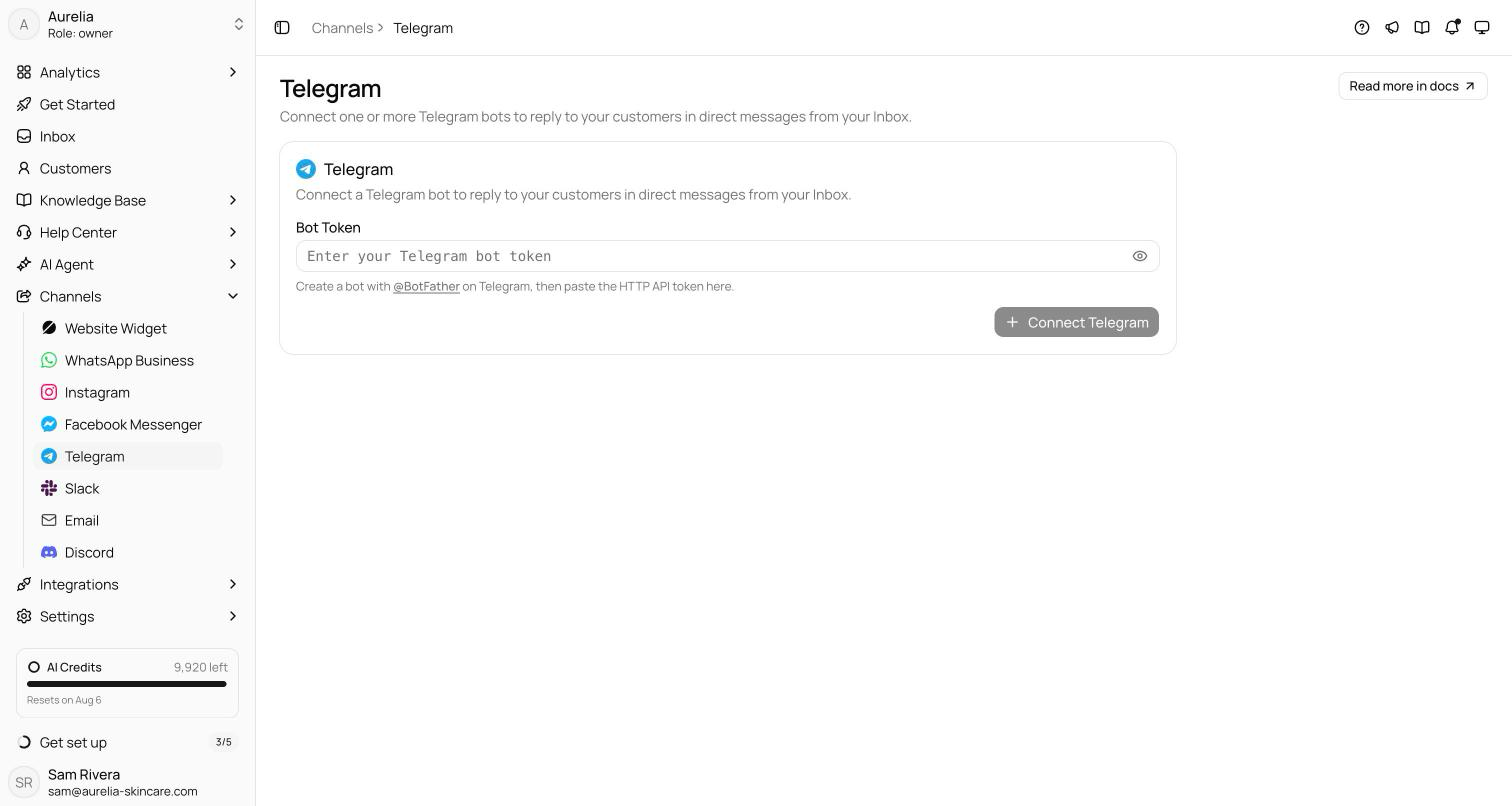
Connecting a bot doesn't switch the AI agent on for Telegram. Switch on Telegram under AI Agent → Deploy; until you do, the bot's page says the agent isn't answering any Telegram bot yet, and messages wait in the Inbox for your team.
Asks also sets up the bot's profile in Telegram: a command menu with /start and /help, and a short description that invites customers to chat with your workspace. The bot's name and profile picture stay yours. Change them in @BotFather (/setname, /setuserpic), then click Sync from Telegram under Bot profile.
Verify it works — on the bot's page, open the bot link in Telegram, tap Start, and send a question. The bot greets you, the AI agent answers in the chat, and the conversation appears in your Inbox.
Share your bot
Customers have to open the bot and tap Start before it can reply: Telegram doesn't let bots message people first. The Share your bot card on the bot's page gives you:
- Bot link —
t.me/yourbot, to copy or open in Telegram. - QR code — Download PNG for packaging, receipts, flyers, or your shop counter.
- Source tag (optional) — enter a tag such as
instagram_bioand the link and QR code becomet.me/yourbot?start=instagram_bio. Conversations that start from a tagged link show the tag as Started from link in the Inbox's customer panel, so you can see where chats come from. Tags use up to 64 letters, numbers, underscores, or hyphens.
How messaging works
- Direct messages only. The bot answers one-to-one chats. If someone adds it to a group, it posts one note with an Open private chat button and doesn't answer in the group.
- Welcome and help.
/startand/helpare answered instantly, with your widget greeting (or a standard welcome) and a short note on how the chat works. They don't use AI credits. - No messaging window. Telegram has no reply deadline. You and the AI agent can reply to any conversation at any time.
- What customers can send. Text, photos, videos, voice notes, files and PDFs, stickers, GIFs, locations, and contacts all reach the Inbox (files up to 20 MB). Voice notes are transcribed so the AI agent can answer them. Edited messages update in the Inbox.
AI replies
The AI agent uses Telegram's own features when they help:
- Link buttons under a message, for a product page, a policy, or order tracking.
- Product cards — the product photo with its name and price, and a View product button.
- Quick replies — suggested answers as buttons; tapping one sends it as the customer's message.
- Share my phone number — when the agent asks for a phone number, the customer can share the one on their Telegram account with one tap. It's added to the customer's profile when the profile has no phone yet.
The bot shows "typing…" while the agent works. AI Agent → Deploy switches the agent on or off for every Telegram bot at once; the AI replies switch on a bot's page turns it off for that bot only. With the agent off, messages still land in the Inbox for your team.
Your team in the Inbox
Take over any conversation from the Inbox (Takeover & collaboration). Your replies, text and attachments, are sent as the bot. The customer panel links the customer's Telegram username.
If a customer blocks the bot, the conversation shows a banner saying replies won't be delivered until they unblock it, and a failed reply says the customer blocked the bot. The banner clears when the customer writes again.
Troubleshooting
"That doesn't look like a bot token"
Copy the entire token from BotFather, including the number and the colon. Send /token to BotFather to see it again.
The bot stopped answering after a token change
Revoking a token in @BotFather (/revoke) stops delivery to Asks right away. The bot's page shows an error with Reconnect and Update token. Click Update token, paste the new token, and click Save token. The bot keeps its conversations. Asks also checks connected bots in the background and emails an alert when one stops working.
"Already connected to another Asks workspace"
A bot can be connected to one Asks workspace at a time. Disconnect it in the other workspace first, or create a separate bot in @BotFather for this one.
The bot doesn't answer in a group
Expected. The Telegram channel handles direct messages only; in a group, the bot posts a link to a private chat.
Can I message a customer who never wrote in?
No. Telegram bots can only reply to people who have started a chat with them.
What happens when I disconnect?
Messages to the bot stop reaching Asks, and conversation history stays in your Inbox. Telegram holds messages sent in the meantime for up to 24 hours: click Reconnect on the bot's page and they're delivered.