Shipping
Shipping
Set the shipping fees the AI agent and your team quote, from your own flat or per-province rates, store pickup and live courier rates from up to five pickup addresses.
The AI agent and your team quote shipping only from the options you set here, never from an estimate. Set them under Commerce → Settings → Delivery rates (owners and admins).
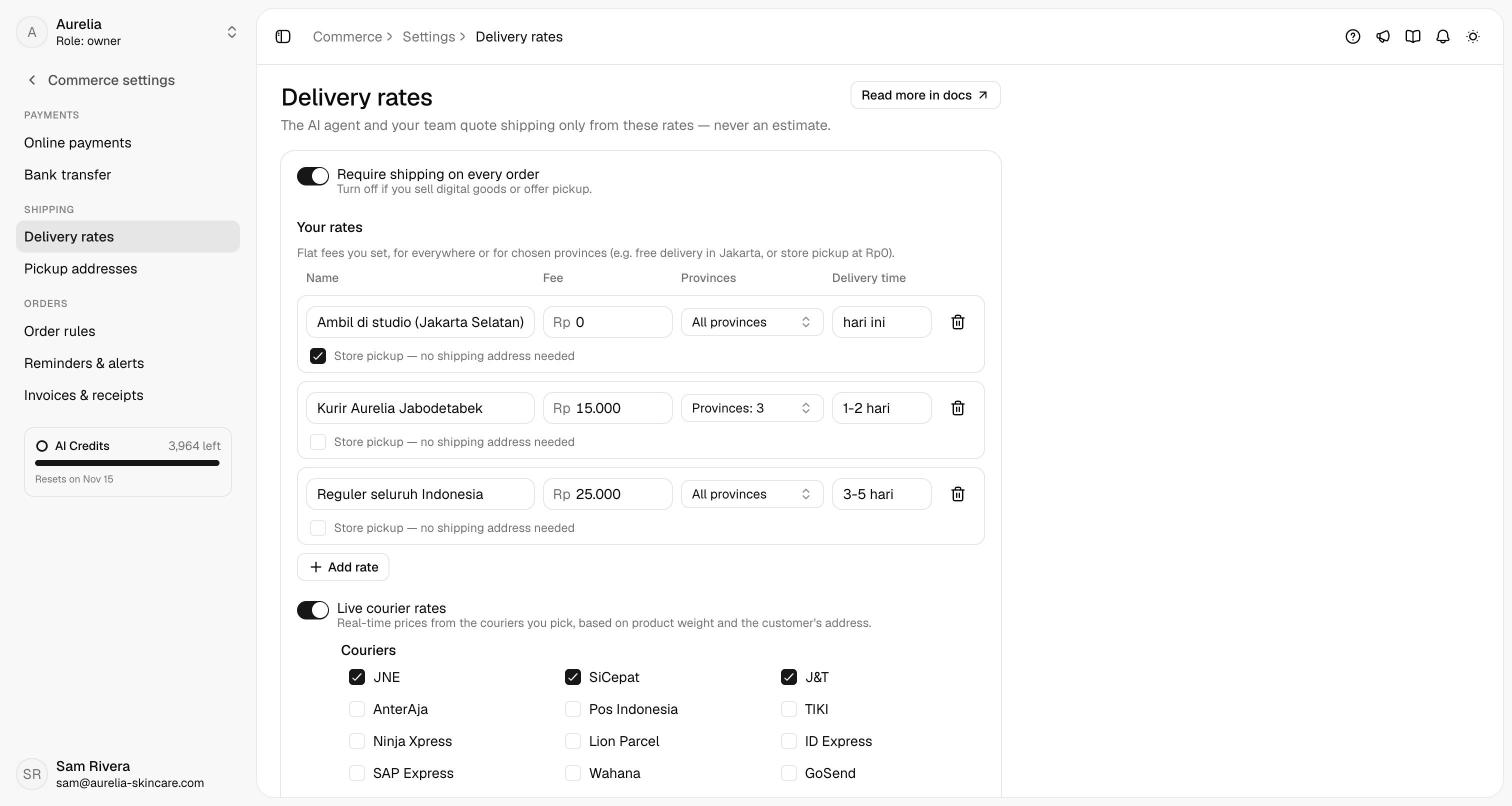
Require shipping
Require shipping on every order is on by default: every order needs a shipping address and a shipping option. Turn it off if you sell digital goods or offer pickup, and shipping becomes optional.
Your rates
Under Your rates, click Add rate and enter a name (for example Kurir toko), the Fee, the provinces it covers, and a Delivery time such as 1-2 days. Leave the provinces on All provinces, or pick any of Indonesia's 38 provinces: free delivery in Jakarta is a Rp0 rate for DKI Jakarta. Add up to 30 rates.
For collection at your store, add a rate (usually Rp0) and tick Store pickup — no shipping address needed. When a customer says they'll pick the order up, the agent chooses it without asking for an address.
Click Save.
A customer sees the rates that cover their province, plus any pickup rate. If you ship everywhere, keep one rate on All provinces, so every address has an option.
Pickup addresses
Pickup addresses holds the addresses couriers pick your orders up from: up to 5, such as your store and a warehouse. Courier rates are quoted from one of them.
Click Add address and give it a Name. Pick its Area by searching a district, city or postal code (at least 3 characters), or enter the Postal code. Contact name, Contact phone, Address and a Pickup note for the courier are optional.
Click Set pin on map and place the pin on the exact pickup spot. Instant couriers (GoSend and GrabExpress) price a delivery only when the pickup address and the delivery address both have a pin. The address shows Pin set or No pin; Move pin and Remove pin change it.
The first address is the Default; Make default moves it. Click Save.
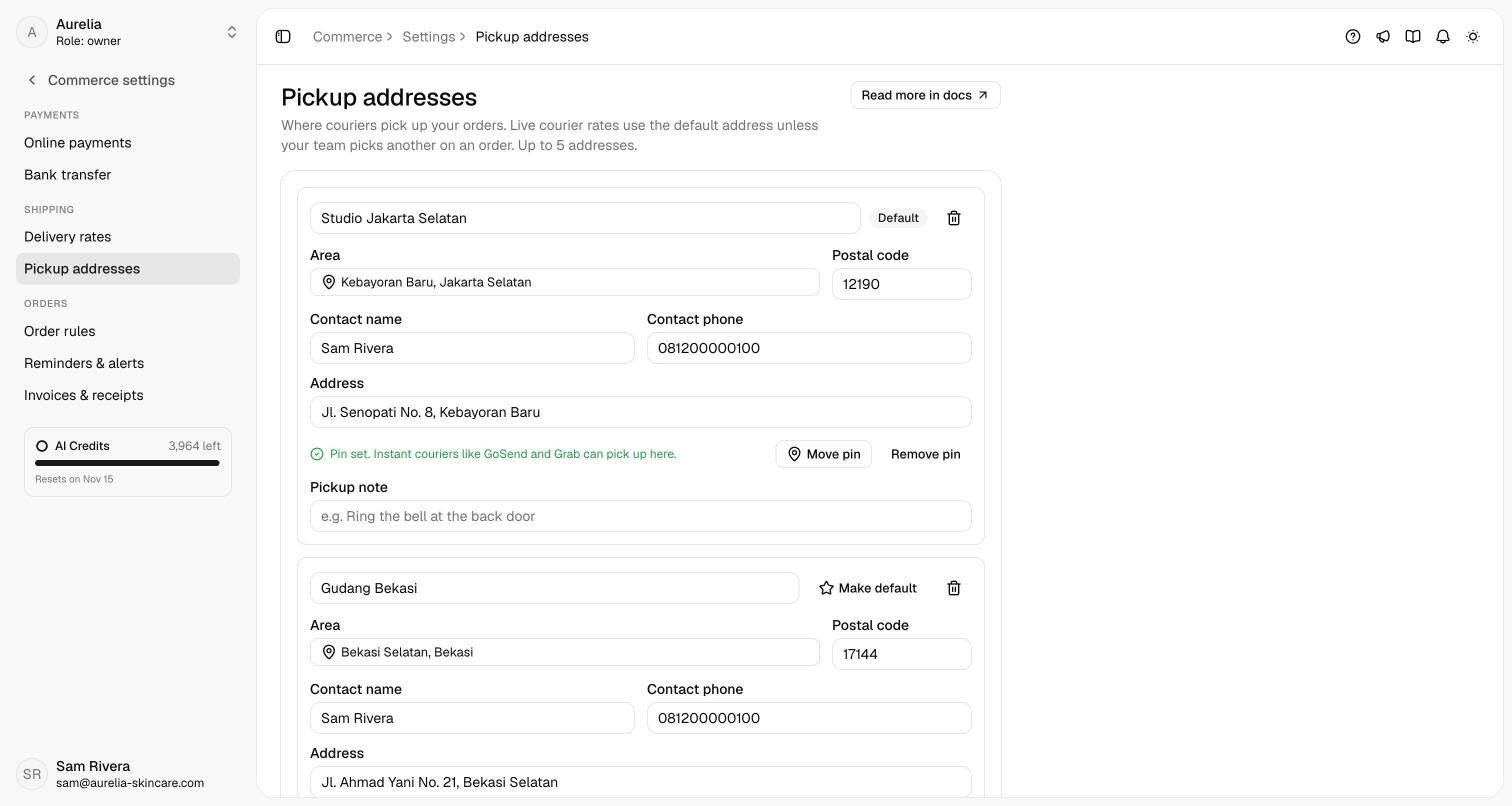
The AI agent quotes from the default address. On Create order, when you have more than one, Ship from picks the address for that order; the order keeps it and shows it under Shipping.
Live courier rates
Turn on Live courier rates to add real-time prices from couriers, based on the order's weight, the pickup address and the customer's address. Under Couriers, tick the ones you use: JNE, SiCepat, J&T, AnterAja, Pos Indonesia, TIKI, Ninja Xpress, Lion Parcel, ID Express, SAP Express, Wahana, GoSend and GrabExpress.
Courier rates stay off until you have a pickup address and at least one courier. Asks looks the prices up for you through Biteship, so you don't need a courier account. Asks only quotes the price: book the pickup with the courier yourself, then enter the tracking number on the order. Weight comes from each variant's Weight (g) in Products; a variant without a weight counts as 500 g. If the courier lookup fails, the agent offers your own rates only.
Couriers such as JNE and J&T price by area and postal code. Instant couriers need pins at both ends: set the pickup pin here, and the delivery pin comes from the map on Create order, a location the customer shared, or a saved address with a pin.
How shipping is quoted
- The agent asks for the street address and the 5-digit postal code (kode pos), or uses a saved address or a location the customer shared, before it prepares the order summary, then lists the options with their fees and delivery times. The fee it puts in the summary is the one the customer chose. See Orders in chat.
- Your team, on Create order, picks a saved address or enters a new one (on the map or by typing), chooses Ship from when there are several pickup addresses, and clicks Get shipping options. When no rate covers the address, enter a Manual fee with a label; with Require shipping off you can also pick No shipping.
Once the order ships, enter the courier's tracking number on the order to notify the customer: see Fulfil an order.
Related
- Payments & settings — the other Commerce settings.
- Products — weights for courier rates.
- Customers & addresses — saved delivery addresses and the map.
- Orders — shipping and completing orders.