Team & roles
Team & roles
Invite teammates, understand what owners, admins, and members can do, and transfer ownership safely.
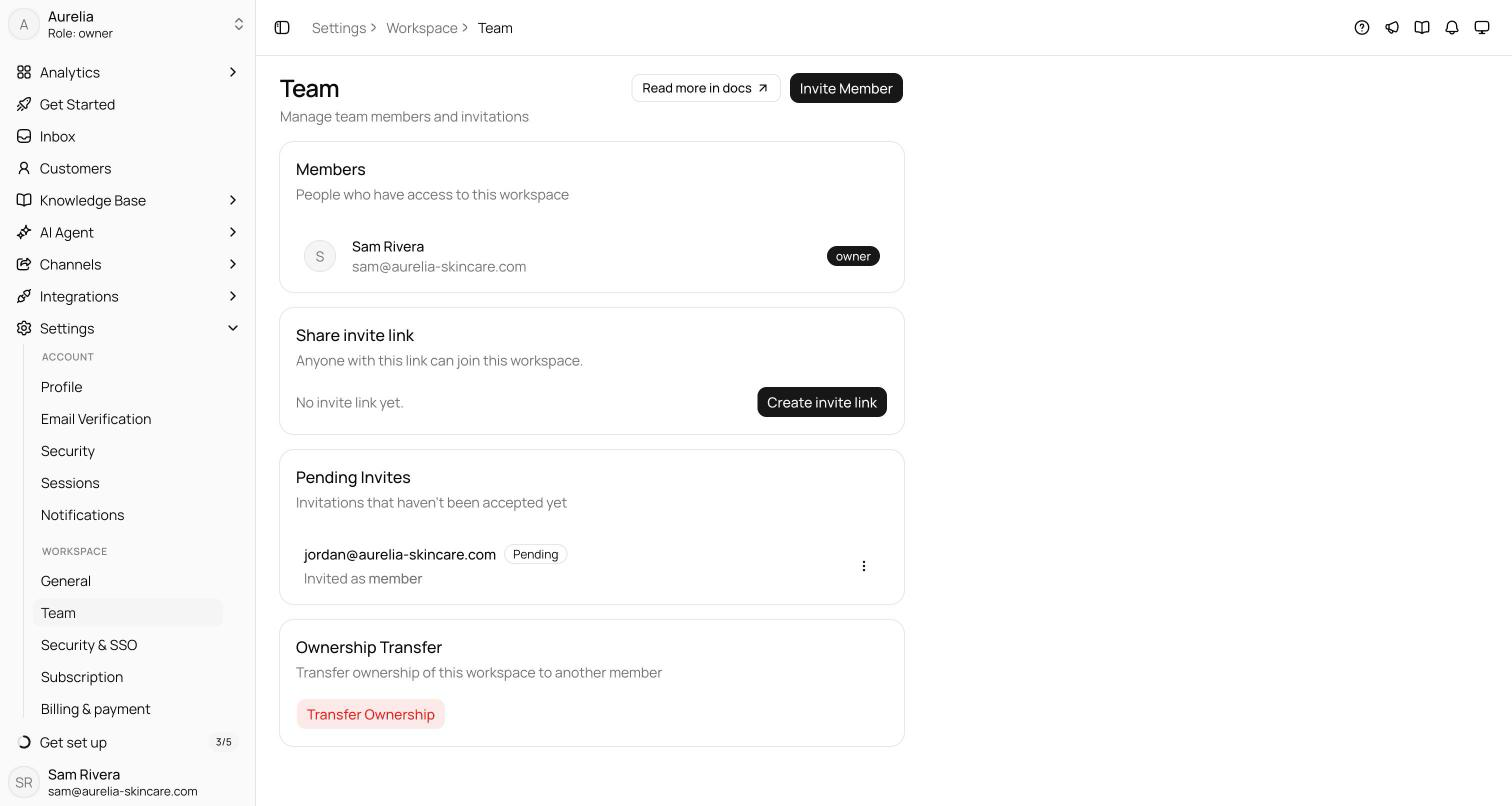
Every workspace has exactly one owner, plus any number of admins and members up to your plan's seat limit. Manage the team at Settings → Workspace → Team.
Roles
Members handle the day-to-day work; owners and admins configure the workspace. Asks enforces these roles on every request, not only in the dashboard.
| Capability | Owner | Admin | Member |
|---|---|---|---|
| Inbox, customers, tickets, canned responses, knowledge base | Yes | Yes | Yes |
| Analytics and the subscription page (view) | Yes | Yes | Yes |
| AI agent settings, actions, data collection, MCP servers | Yes | Yes | No |
| Connect and configure channels and integrations, API keys, webhooks | Yes | Yes | No |
| Workspace settings, tags, SLA policies, Outbound campaigns | Yes | Yes | No |
| Commerce: create, edit, ship and cancel orders; attach payment proofs; customers' saved addresses | Yes | Yes | Yes |
| Commerce: settings, products, vouchers, marking a transfer paid, rejecting a payment proof, recording a refund | Yes | Yes | No |
| Invite people and manage the invite link | Yes | Yes | No |
| Remove a teammate | Yes | Yes | No |
| Plans, add-ons, top-ups, cancellation | Yes | Yes | No |
| SAML SSO and verified domains | Yes | Yes | No |
| Change a member's role | Yes | No | No |
| Transfer ownership | Yes | No | No |
| Export workspace data, delete the workspace | Yes | No | No |
A few rules keep the owner seat safe:
- There is exactly one owner. The owner role is never granted by an invite or a role change — only through ownership transfer.
- Only the owner changes roles, between Admin and Member, with Update Role next to each teammate.
- The owner can't be removed and can't leave the workspace. Everyone else can leave from Danger Zone, and owners and admins can remove them.
Invite by email
Select Invite Member on the Team page, enter the person's email, pick Admin or Member, and select Send Invite. To make someone the owner, invite them as an admin, then transfer ownership. Email invites expire after 7 days. Open invites appear under Pending Invites, where you can resend one (which restarts its 7 days) or cancel it. A workspace can send up to 20 invite emails in any 24 hours, resends included, and each person up to 30 across their workspaces — to bring in more people at once, use the invite link.
The email links to app.asks.app/invite/<token>. The invite is tied to the address it was sent to: the person signs in with that email, or creates an Asks account with it, and joins in one step.
If the invitee already has an Asks account and has turned off Team Invites emails, no email is sent — share the invite link with them instead.
Invite by link
To onboard several people at once, select Create invite link in the Share invite link card. The link always grants the Member role, has no use cap, and expires after 30 days. Anyone who opens app.asks.app/join/<token> signs in or creates an account and joins, as long as a seat is free. Regenerate replaces the link and stops the old one working; Revoke turns it off. People who already joined keep their seat either way.
You can also paste an invite link or token into Join workspace in the workspace switcher.
Shopify store owners
When the account owner of a Shopify store opens Asks from their Shopify admin, Asks adds them to the workspace connected to that store as an Admin, if they aren't a member yet. This is how a merchant gets into a workspace an agency or staff member set up for them. It applies only to the store's Shopify account owner — never to staff accounts or collaborators — and ownership of the workspace still moves only through ownership transfer. See Shopify.
Seats
Seats count the people who have joined the workspace, the owner included, plus pending email invites — an invite holds its seat until it's accepted, cancelled, or expires. Free includes 1 seat, Starter 10, Business 25, and Premium 50. Each Extra team members add-on ($25 a month) raises the limit by one — manage it at app.asks.app/subscription. The full matrix is in Limits & quotas.
When the workspace is full, new invites and link joins are refused until you free a seat or add one. Removing a teammate frees their seat right away. A Shopify store owner joining their own store's workspace is never turned away.
Remove a teammate
Owners and admins can remove anyone except the owner and themselves. To leave a workspace yourself, use Danger Zone.
On the Team page, select Remove next to the teammate.
Select Remove member in the confirmation. They lose access right away and get an email letting them know. Conversations and tickets assigned to them go back to the unassigned queue, so nothing stays stuck with someone who's gone.
You can invite a removed teammate again later; they rejoin with whatever role the new invite grants.
Transfer ownership
Only the current owner can transfer ownership, and only to an existing admin or member.
In the Ownership Transfer card, select Transfer Ownership, choose the new owner, and select Send OTP.
Asks emails the current owner a 6-digit code, valid for 15 minutes. Enter it and select Verify and Transfer. The previous owner stays in the workspace as an admin.
Multiple workspaces
One account can belong to many workspaces — each with its own agent, team, plan, and billing. Switch between them with the workspace switcher at the top of the sidebar, or pick Create workspace there to set up a new one through the onboarding wizard.
Related
- Security — 2FA, sessions, and SAML SSO with automatic provisioning.
- Plans & billing — who can change the plan, and the seat add-on.
- Takeover & collaboration — how teammates work conversations together.