Shopify
Shopify
Connect your Shopify store so the agent answers with live products, policies, carts, and order status.
Connecting Shopify makes your agent store-aware on every channel. It searches your live catalog, quotes your actual policies, builds a cart for the customer, and looks up order status — all against your store at answer time, so answers stay current.
You work in the Asks dashboard — the Shopify app is a connector with no screens inside your Shopify admin. Installing it, and opening it later from your Shopify admin, takes you to app.asks.app in a new tab and signs you in. Only workspace owners and admins can connect or disconnect a store.
Connect your store
Install Asks from the Shopify App Store and approve the permissions Shopify asks for.
Shopify opens Asks in a new tab and signs you in with your Shopify identity — no separate sign-up. If an Asks account already uses your email, you log in once to link it.
A new store starts onboarding in a new workspace, with your store's details filled in. A connected store opens its own workspace. Reinstalling the app after an uninstall reconnects the store to its previous workspace, setup intact.
Onboarding's go-live step offers Add to my store; later, the Chat widget's Deploy tab has Add to theme. Either opens your theme editor with the widget turned on — select Save there. See Widget on your storefront.
If someone else — a staff member or an agency — set Asks up for your store, the store's Shopify account owner joins that workspace as an admin the first time they open Asks from Shopify.
Without the app, pasting your store URL into the onboarding wizard also works: Asks detects Shopify storefronts, including on custom domains, and answers product, policy, and cart questions from that alone. The app adds the one-click widget install, order status, and Shopify billing.
Verify it works — open your storefront, start a chat, and ask about a real product. The answer should quote the live price and link to the product page.
Manage the connection
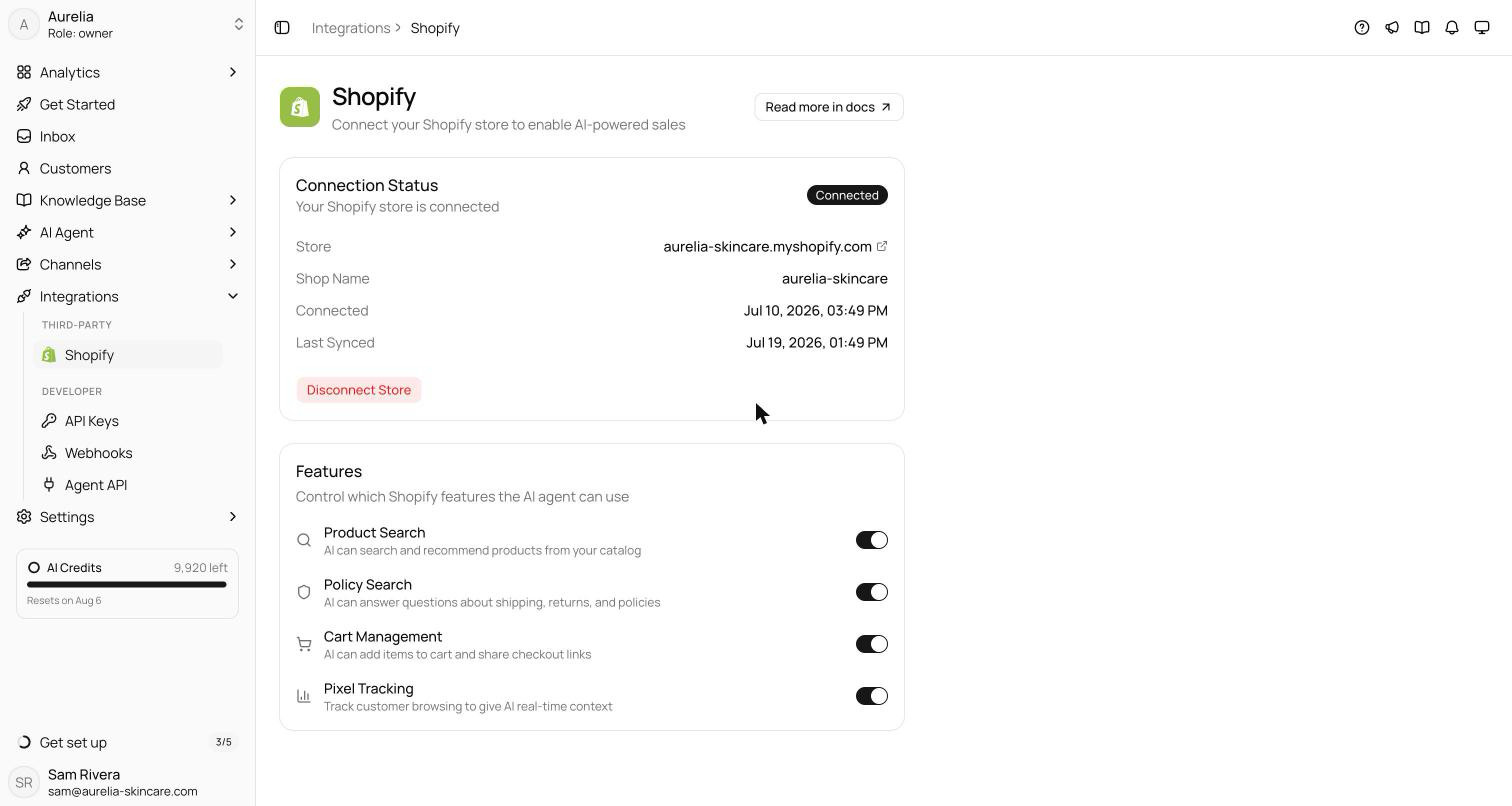
Open Integrations → Shopify. The Connection Status card shows the store, shop name, when it connected, the last sync, and Disconnect Store. The Features card turns each capability on or off; save changes from the bar that appears.
| Feature | What it does |
|---|---|
| Product Search | Searches your live catalog and answers with product names, prices, links, images, and per-variant availability |
| Policy Search | Answers shipping, returns, refunds, privacy, and terms questions from your store's actual policies and FAQs |
| Cart Management | Builds a cart for the customer in the conversation — add, update, remove — and shares the checkout link. The agent never places the order |
| Pixel Tracking | Gives the agent context on what the customer is browsing — products viewed, searches, cart activity. Asks turns the web pixel on when the store connects; it only collects from visitors who allow analytics under your store's privacy settings |
Order status
With the app installed, the agent answers "where is my order" questions with payment status, fulfillment status, items, and tracking links, for up to three recent orders. Order details are never shared on an unverified identity:
- An order number alone is never enough — the customer also gives the email on the order.
- To prove the email is theirs, the customer enters a six-digit code that Asks emails to that address. Once verified, the email stays verified in that conversation for 30 minutes.
- On WhatsApp, the customer's own number verifies orders placed with it.
The agent's Shopify access is read-and-assist only. It does not create, modify, cancel, or refund orders, edit inventory, or generate discount codes.
Store content and your knowledge base
Products and policies are read live at answer time, so a price change shows up in the next answer. For the same reason, knowledge base website crawls skip product, collection, cart, checkout, account, and policy pages. When the store connects, Asks also copies its legal policies and content pages into the knowledge base as editable articles, which count toward your knowledge item limit. The knowledge base covers what store data doesn't — guides, sizing, brand story.
Widget on your storefront
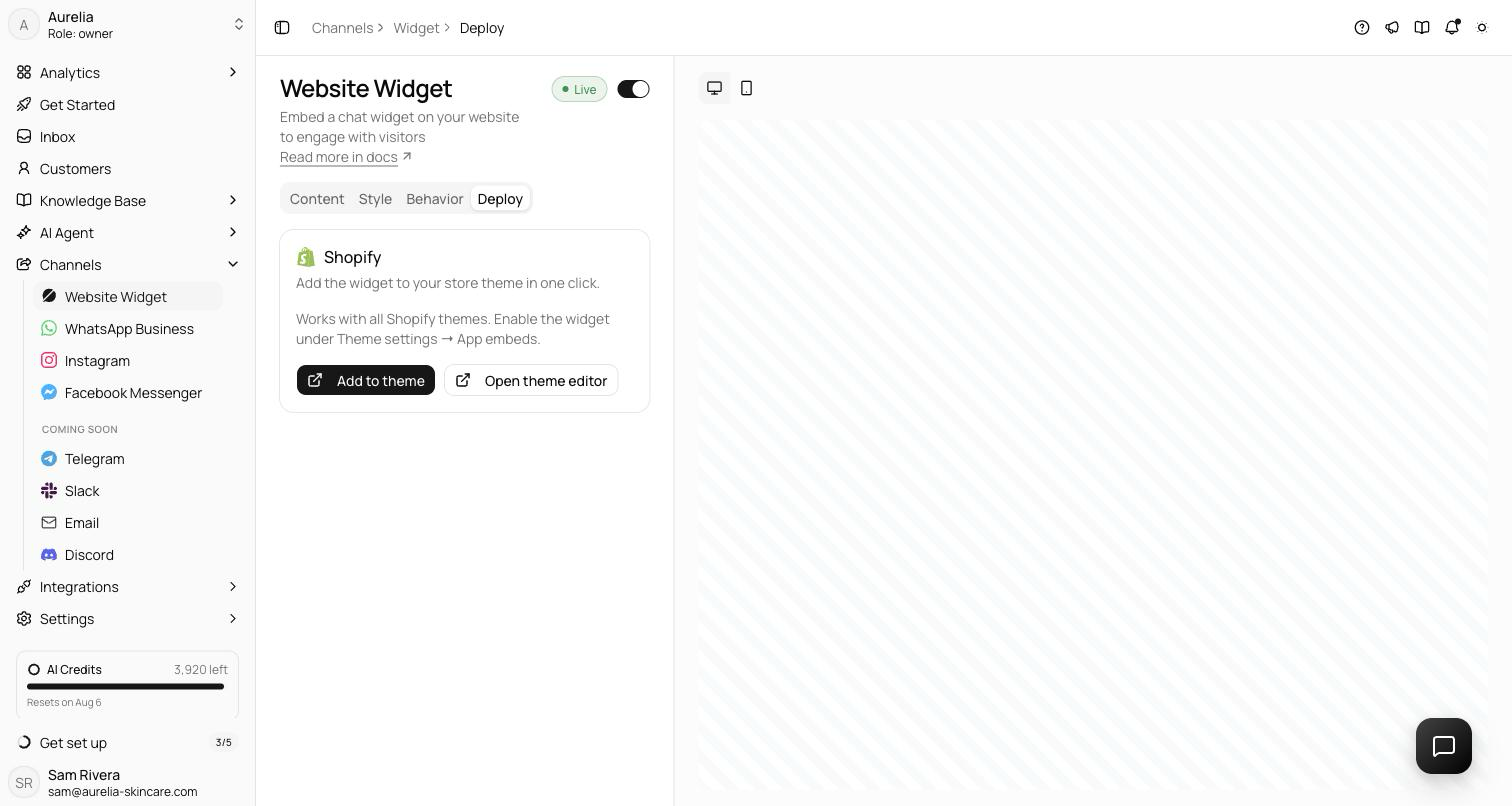
With the store connected, the Chat widget's Deploy tab shows one Shopify card instead of the install snippets. Select Add to theme — your theme editor opens on App embeds with the Asks Widget embed turned on — then Save in Shopify. It works with all Shopify themes. Once the embed is on, the card reads "Widget is on your Shopify storefront." with Open theme editor and View store links.
The same embed shows Spotlight when that's your live on-site channel, and passes signed-in customers' names and emails to personalize the chat.
Billing through Shopify
While a store is connected, your subscription is billed through Shopify at the same prices. Plan changes, add-ons, canceling, and resuming all happen on the Asks Subscription page; you approve each charge on Shopify's page, and Open Shopify billing takes you to your Shopify bills, including settling a held payment. Enterprise, one-time top-ups, and auto-recharge aren't available on Shopify billing. Deleting the workspace cancels its Shopify subscription immediately. See Plans & billing.
Troubleshooting
Product answers work but order status doesn't
Order status needs the installed app — storefront detection alone can't see orders. Also check that the customer verified the email on the order.
The agent stopped answering product questions
Check the Product Search switch on the integration page, and that the store still shows Connected.
I'm asked to replace or move a store
Connecting a store when the workspace already has one prompts "Replace connected store?" — confirming swaps the connection. Connecting a store that's attached to another workspace prompts "Move store to this workspace?" — confirming moves it, and the other workspace loses its Shopify features.
What happens when I disconnect?
The agent loses product search, policies, cart management, and order lookups, and pixel tracking data is cleared. Conversations and your knowledge base are unaffected.