Abandoned orders
Abandoned orders
When a customer goes quiet on an order summary or a payment link runs out, they get one reminder in the chat, and the AI agent picks the order back up if they reply.
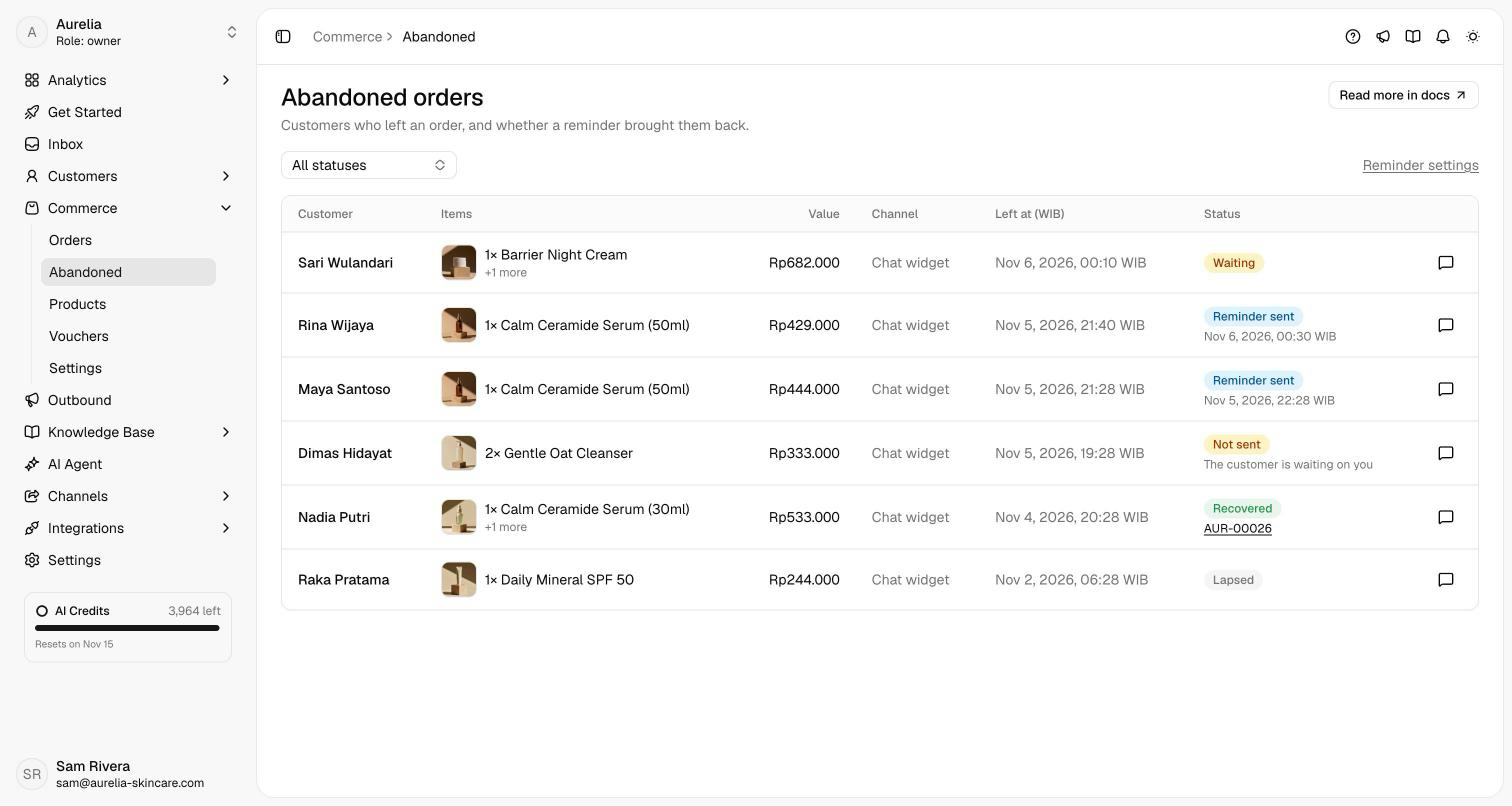
Some customers ask for a summary and never answer. Others let a payment link run out. Commerce → Abandoned lists them, and each gets one reminder in the same conversation. Because Asks already holds the conversation, the reminder names their exact items and the AI agent carries on from where they stopped.
What counts as abandoned
- A summary with no answer. The AI agent prepared an order and the customer said nothing after that.
- A payment link that ran out. An order was created, and its Xendit link expired unpaid. Bank transfers don't expire, so they get the payment reminder instead.
A customer who replied isn't on hold, whatever they said: "not now" is an answer. An order placed without any reminder was never abandoned, so it doesn't appear here.
The reminder
After the delay you set, the customer gets one message in their language with their items and a button to carry on. It never states a price or a total: those are worked out again when they reply.
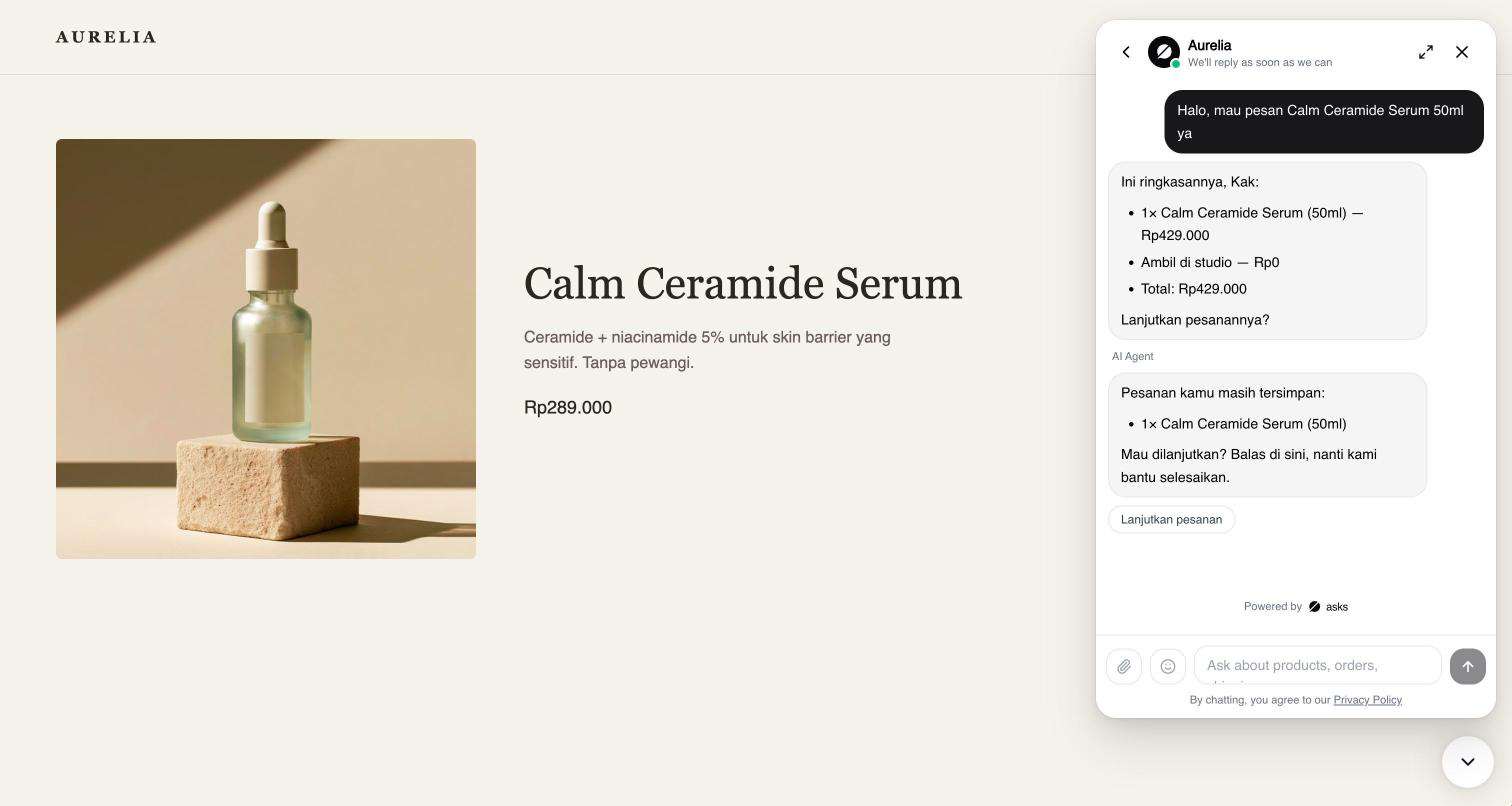
Asks sends it only when all of these hold:
- The conversation is open, and no one on your team has taken it.
- You answered last. A customer waiting on you is never nudged.
- The customer has said nothing since the summary or the expiry.
- No automatic follow-up has gone out since then, and no reminder in this conversation in the last 7 days. Whichever comes first, they get one nudge.
- On WhatsApp, Instagram and Messenger, it's within 24 hours of their last message.
- Every item can still be sold.
After 72 hours a cart lapses and no reminder goes out.
When the customer replies
The AI agent restores the items, address, shipping choice, voucher and payment method, then shows a new summary with today's prices, stock and shipping rates. If something changed, such as a price or a voucher that no longer applies, it says so. The order is created only after the customer confirms, as usual. If the payment link had expired, it sends a new link for the same order.
Statuses
| Status | Meaning |
|---|---|
| Waiting | The reminder goes out once the delay has passed. |
| Not sent | Held back for the reason shown, such as The customer replied or Outside the 24-hour window. |
| Reminder sent | Sent at the time shown, with no order yet. |
| Recovered | An order followed the reminder, or the expired order got paid. The order number links to it. |
| Lapsed | No order within 72 hours. |
The speech bubble on each row opens the conversation, so your team can step in. Paid sales from recovered orders are on Analytics → Sales.
Set it up
Under Commerce → Settings → Reminders & alerts (owners and admins):
| Setting | Default | Details |
|---|---|---|
| Recover abandoned orders | On | Off, nothing is sent; the list still shows who left. |
| When to send it | 1 h after they go quiet | 30 minutes, or 1, 3, 6 or 12 hours. |
Related
- Orders in chat — how the agent takes an order.
- Reminders & alerts — the payment reminder and team alerts.
- Sales — recovered sales next to your other numbers.