Knowledge items & limits
Knowledge items & limits
What counts as a knowledge item, what each plan includes, and what happens when you reach the limit.
Your knowledge base is measured in knowledge items — the unit the sidebar meter, the plan cards, and your subscription page show. Every item you add counts as exactly one, whatever its type:
- an article you write — public or internal, draft or published, in any folder,
- an uploaded file (PDF, DOCX, …) — one file is one item, regardless of file size,
- a synced web page — one page is one item.
Importing 10 URLs and uploading 3 files uses 13 knowledge items. Your plan sets how many the knowledge base can hold, and you can add, edit, or remove them at any time — deleting an item frees its slot immediately. A document whose upload failed doesn't count, and a Shopify catalog answered live uses none at all.
Limits by plan
| Limit | Free | Starter | Business | Premium |
|---|---|---|---|---|
| Knowledge items | 50 | 300 | 1,000 | 3,000 |
| Website re-sync frequency | Weekly | Weekly | Daily | Daily |
| Contextual chunk indexing | — | — | — | Yes |
Enterprise contracts set their own quotas. Need more on a paid plan? Add Extra Knowledge Items — blocks of 100 at $19/month each — from Subscription. Add-ons need a paid plan; on Free, upgrade instead. For the full plan matrix — credits, seats, and everything else — see Limits & quotas.
The re-sync frequency applies to both the auto-refresh schedule and the manual Sync button; a newly added website syncs freely for its first 24 hours while you set it up.
Operational caps
These are identical on every plan. They keep crawls fast and predictable rather than meter your knowledge:
| Cap | Value |
|---|---|
| Extracted text per item | 2 MB (far more than any normal page or document) |
| Uploaded file size | 10 MB per file |
| Pages per website crawl | 2,000 |
| Crawled pages per workspace | 10,000 per rolling 24 hours |
| Website syncs per workspace | 30 per hour |
| URLs in the review-pages picker | 5,000 per site |
The usage meter
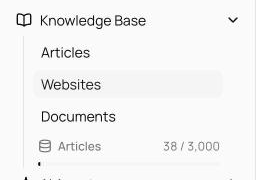
The bottom of the knowledge base sidebar shows a live Knowledge items meter: items used against your plan's limit. The info icon explains what counts. The bar turns amber at 80% with an Almost full — upgrade link, and red at 100% with Limit reached — upgrade; both open the Subscription page. The meter updates as you add or delete content.
What happens at the limit
- New articles and uploads that would exceed the limit are rejected with "Knowledge item limit reached. Upgrade your plan or add more knowledge items." Nothing partial is stored.
- Website syncs stop at the first new page that doesn't fit: pages indexed before that stay, and the website's page list shows Last sync stopped early — "your plan's knowledge item limit was reached" — with an Add knowledge items button. Existing pages the crawl reached before stopping are refreshed; the rest wait for the next sync.
- Existing content keeps working. The agent still answers from everything already indexed; you only lose the ability to add more.
Asks emails the workspace owner and admins when usage passes 85% of the limit, when new content is rejected, and when a sync stops early on the limit.
To get back under the limit, delete items you no longer need (slots free immediately), upgrade your plan, or add the Extra Knowledge Items add-on.