Articles
Articles
Write knowledge directly in the dashboard — public help articles, internal-only guidance, drafts, and folders.
Articles are knowledge you write yourself, in the dashboard, with no source site or file behind them. Use them for the answers you want stated exactly one way: return policies, shipping rules, pricing exceptions, or guidance that exists nowhere else. Manage them at app.asks.app/knowledge-base/content.
Write an article
Click + New content on the Articles page and pick a type — Public article or Internal article — to open the editor with that type pre-selected (you can change it later in the Details rail). Write the title and body; the body supports rich text. An optional description gives readers — and the agent — a one-line summary.
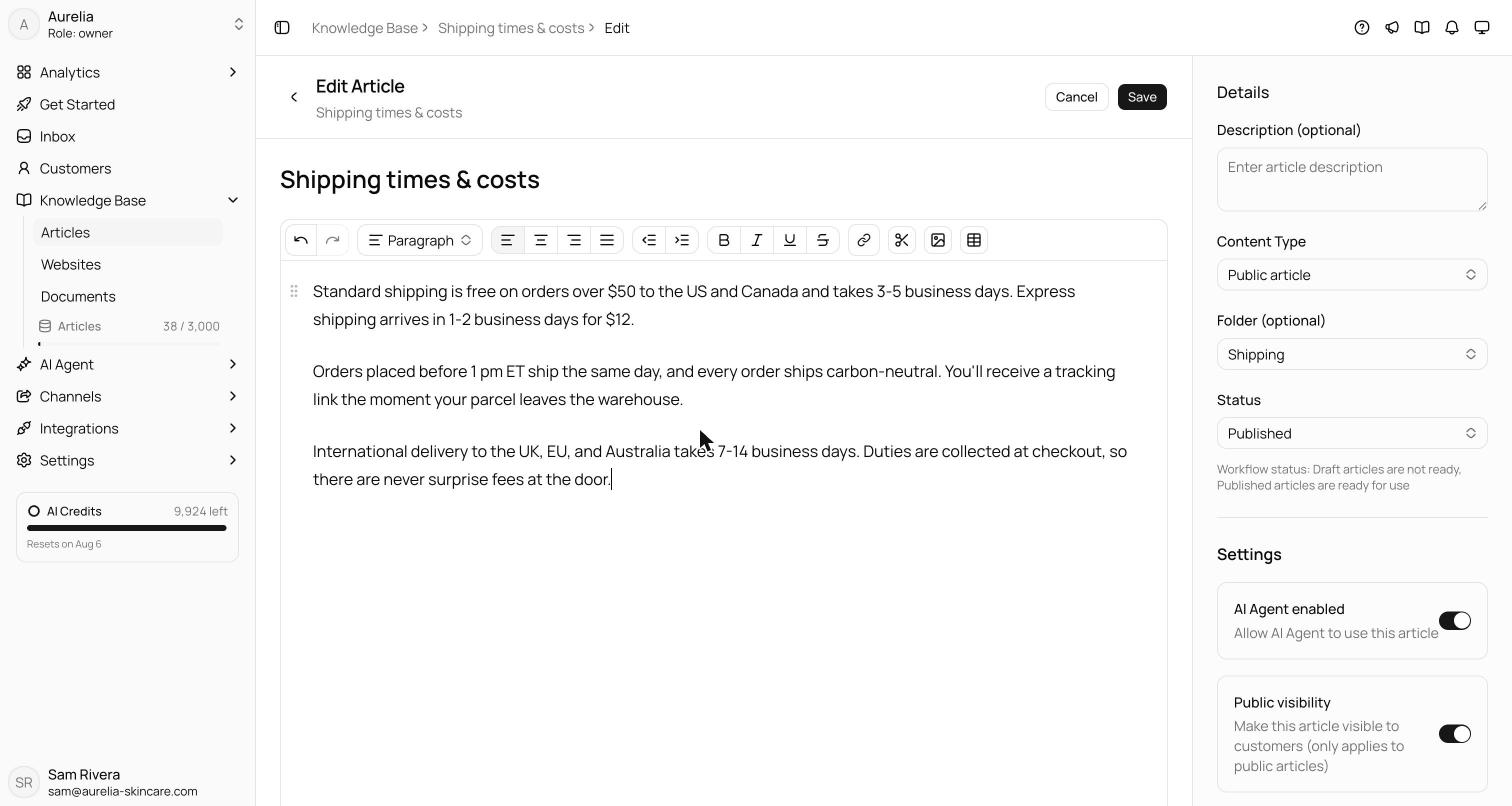
Content Type sets the audience:
- Public article — written for customers. Can appear in your Help Center.
- Internal article — hidden from Help Center pages. When published and AI Agent-enabled, its content can inform customer replies. Use it for edge-case handling, escalation rules of thumb, or facts you want answered without publishing a page about them.
Assign a Folder to keep the list organized. New folder creates a folder inside the one you're viewing, so folders nest; rename or delete them from the folder tree. Only an empty folder can be deleted — move or delete its articles and subfolders first. The page shows the folder tree alongside a search box, an Audience filter (Everyone, Public only, Internal only), + Filters (status, type, AI Agent), and a Group by control (folder, status, type, or date).
New articles start as Draft, with AI Agent enabled and Public visibility both off. Status is the workflow gate: Draft means not ready, Published means ready for use. Only published articles with AI Agent enabled turned on are indexed for the agent — drafts never reach it, so you can work on an article safely over time.
Set Status to Published, turn on AI Agent enabled, and click Create (or Save on an existing article). Saving a published, AI-enabled article re-indexes it immediately; there is no separate training step.
Visibility controls
Three settings decide who sees an article and how it's used:
| Control | Effect | New articles |
|---|---|---|
| Status | Published articles are ready for use; drafts are never indexed | Draft |
| AI Agent enabled | The agent may use published article content in customer replies, including internal articles | Off |
| Public visibility | Show the published public article in your Help Center | Off |
The AI Agent and Public visibility columns in the Articles list have the same switches, so you can flip them without opening each article.
Public visibility is what connects articles to your Help Center: a published public article with the switch on can be shown there. In the editor, the switch is disabled for internal articles. Help Center is in limited release, so on most workspaces this switch has no visible effect yet.
When to use articles
- Canonical answers — when the agent must phrase something one exact way, write it as an article rather than relying on a crawled page.
- Policies — returns, refunds, warranties, shipping cutoffs. Short, declarative articles retrieve cleanly.
- Gaps — anything customers ask that your site doesn't cover. On Business and Premium, analytics groups these as knowledge gaps and can draft an article for each one.
- Internal-only guidance — context the agent needs that you'd never put on your website.
Every article counts as one knowledge item against your plan's limit — public or internal, draft or published, in any folder. See Knowledge items & limits.