Meta Ads
Meta Ads
Send the leads, qualified leads and sales from your click-to-WhatsApp ad chats back to Meta with the Conversions API. A beta for workspaces in Indonesia.
Updated
Integrations → Meta Ads tells Meta what happened after someone tapped your click-to-WhatsApp ad and started a chat. When the chat becomes a lead, a qualified lead or a sale, Asks sends that result to Meta through its Conversions API for business messaging, so Ads Manager can report on your ads and Meta can show them to more people who buy. Analytics → Ads shows the same chats and results per ad.
Beta — Meta Ads is rolling out to workspaces in the Indonesia market: created from Indonesia, or with a WIB, WITA or WIT business-hours time zone. During the beta Asks turns it on per workspace; once it's on for yours, Meta Ads appears under Integrations. Every paid plan and the trial include it, not the Free plan. Owners and admins connect it and change its settings; every teammate can see the page and its delivery log.
Results are sent for chats on a WhatsApp number connected to Asks, and you can connect Meta Ads before the number is (see below). Instagram isn't supported: Meta doesn't offer this connection for Instagram accounts, so chats from Instagram ads only count in Analytics → Ads.
Connect Meta Ads
Go to app.asks.app/integrations/meta-ads, or Integrations → Meta Ads.
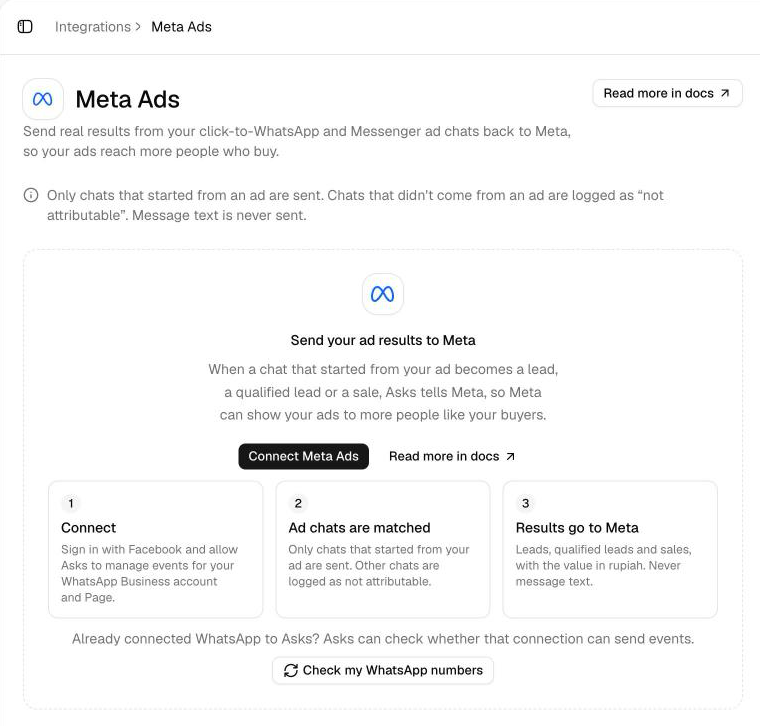
Select Connect Meta Ads, sign in with Facebook and allow Asks to manage events for your WhatsApp Business account. Already connected your WhatsApp number to Asks? Check my WhatsApp numbers checks whether that connection can send events; when it can, Asks doesn't need a second sign-in.
WhatsApp numbers and Pages lists each WhatsApp Business account connected to Asks. Each needs a dataset, Meta's container for these events: Asks creates it, or uses the existing one, and shows Dataset with its ID. For a row that shows "Missing permission to send events", connect Meta Ads again and allow events for that account.
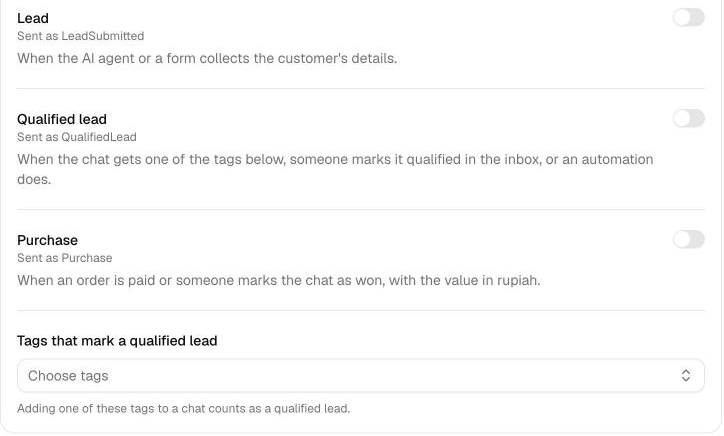
Under Results to send, turn on Lead, Qualified lead and Purchase as you need them; each shows the Meta event it's sent as. Pick the Tags that mark a qualified lead: adding one of them to a chat counts as a qualified lead.
Before your WhatsApp number is connected
Without a WhatsApp number in Asks, the page shows Connect WhatsApp or Messenger first above the connect card, and you can still select Connect Meta Ads. After you sign in, it says Connected to Meta and asks you to connect a WhatsApp number to start sending results; nothing is sent until then.
Once the number is connected, an owner or admin selects Check again in that notice, or Check connection under Test with Events Manager. Asks finds the number and its dataset, and the notice goes away. Results from the number's ad chats before that check show as Failed with "No dataset for this WhatsApp number or Page"; select Retry on them after the check.
Click-to-Messenger ads
A Facebook Page connected to Asks is listed under WhatsApp numbers and Pages too. During the beta, the Meta Ads sign-in covers WhatsApp Business accounts only, so a Page shows "Missing permission to send events" and results from its ad chats aren't sent; with a Page and no WhatsApp number, the page shows Meta Ads needs attention. Chats from Messenger ads still count in Analytics → Ads.
Results
| Result | When Asks records it | Sent to Meta as |
|---|---|---|
| Lead | The AI agent or a form collects the customer's details (Collect Leads, Collect Data). Once per chat. | LeadSubmitted |
| Qualified lead | The chat gets one of your Tags that mark a qualified lead, someone selects Mark qualified in the inbox, or an automation's Send ad conversion step runs. Once per chat. | QualifiedLead |
| Purchase | A Commerce order is paid, including a bank transfer your team marks paid, or someone selects Mark won… in the inbox and enters the sale value. The value is sent in rupiah. Once per order, or once per chat with Mark won…. | Purchase |
Paid Commerce orders are sent by themselves; Mark won… is for sales outside Commerce and is unavailable once the chat has a sale recorded. Mark qualified and Mark won… are in the customer panel's Ad attribution section and add an internal note, never a message to the customer. A customer saying they've paid is never a purchase, and the Playground and Tests never record results.
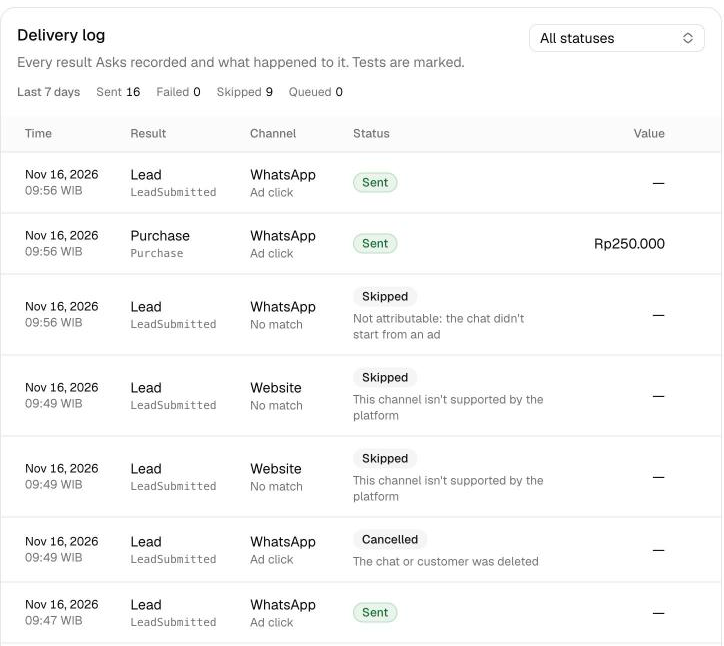
Only chats that started from an ad are sent: a WhatsApp chat from your click-to-WhatsApp ad that passed an ad click id, when the result happens within 7 days of the ad click. Every other result is listed in the delivery log as Skipped with the reason, for example "Not attributable: the chat didn't start from an ad", "The ad click is too old to count" or "The ad didn't pass a click id".
What Asks sends
- Always: the ad click id with your WhatsApp Business account, the result, its time and, for a purchase, the value in rupiah.
- Only with Match with customer contact info (off by default): for a WhatsApp chat from your ad that has no ad click id, the customer's phone number and email, hashed with SHA-256. Phone numbers are first put in international format, with Indonesia as the default (0812…, +62 812…, 62812… and 812… all become +62 812…); a number that isn't valid is never sent.
- Never: message text, customer names, addresses or anything else from the conversation.
Deleting a customer or conversation removes its ad records and cancels its unsent results.
Settings
| Setting | Details |
|---|---|
| Results to send | Lead, Qualified lead and Purchase, each off until you turn it on. |
| Tags that mark a qualified lead | Up to 20 workspace tags. |
| Match with customer contact info | Off by default. Turning it on asks an owner or admin to confirm a lawful basis to share the data with Meta, such as the customer's consent, and records their name and the time. Turning it off cancels the queued results that relied on it; disconnecting turns it off, and after reconnecting it needs a new confirmation. |
| Facebook Page ID | The Page that runs your click-to-WhatsApp ads. Needed to match WhatsApp chats by contact info. |
Verify it works
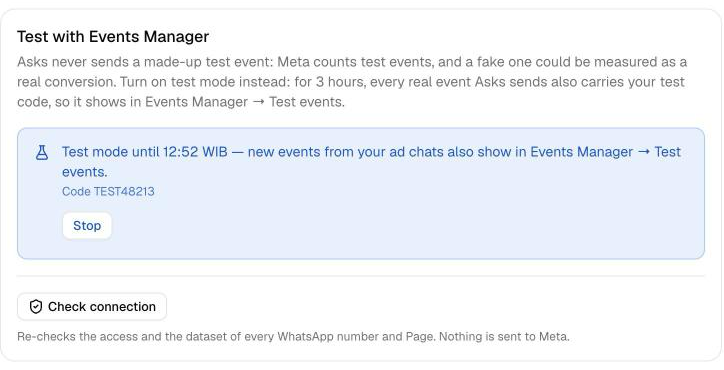
Check connection, under Test with Events Manager, re-checks Asks' access and the dataset for every WhatsApp number, and sends nothing to Meta. To watch results arrive, turn on test mode.
Asks never makes up a test event: Meta counts test events too, and a fake one could be measured as a real conversion. Test mode lets you see real results as they go out:
- In Meta Events Manager, open your dataset → Test events and copy the code shown there.
- In Asks, paste it into Test event code under Test with Events Manager and select Start test mode. Test mode stays on for 3 hours; Stop ends it sooner.
- Start a chat from your ad, or ask a teammate to, and turn it into a result, for example by leaving your details. While test mode is on, every result Asks sends also carries your test code, so it appears in the Test events tab in Events Manager, and in the delivery log in Asks.
Delivery log
The Delivery log lists every result Asks recorded for Meta: its time, result, the chat's channel, how it was matched (Ad click or Contact info), its status and its value.
| Status | Meaning |
|---|---|
| Queued | Waiting to be sent, or waiting to retry after a temporary error. |
| Sending | Being sent now. |
| Sent | Meta accepted it. It's never sent again. |
| Failed | Not sent: the reason says why, such as "Reconnect to send". Owners and admins can select Retry, except when Meta's answer didn't arrive or the sending was interrupted. |
| Skipped | Not sent on purpose: the chat didn't start from an ad, the click is too old, or the plan doesn't include ad conversions. |
| Cancelled | Stopped: Meta Ads was disconnected, contact matching was turned off, or the chat or customer was deleted. |
Meta only accepts an event within 7 days of the result; a result that couldn't be sent in time shows "Too old for the platform to accept". When Meta's answer doesn't arrive, the result shows "Meta may or may not have received this…" and is never sent again, so it can't be counted twice. Asks retries temporary errors by itself. When a plan ends, the page and its history stay visible, and results stop being sent until you choose a plan again.
Reconnecting and disconnecting
If Meta stops accepting the connection, for example because access was removed or expired, the page shows Meta Ads needs attention and results wait in the log as Failed with "Reconnect to send". Select Connect Meta Ads again, or Check again when the access was fixed on Meta's side, then Retry the failed results.
Disconnect stops sending to Meta and cancels the results still waiting. Your delivery history and settings are kept, except Match with customer contact info, which turns off until an owner or admin confirms it again. Nothing from this time is sent later if you connect again.
Related
- Analytics → Ads — chats, leads and revenue per ad.
- WhatsApp — the channel behind your ad chats.
- Collect Leads — how the AI agent collects a customer's details.
- Orders — paid orders, sent as purchases.