Ads
Ads
See the chats your ads started and the leads, qualified leads, purchases and revenue they became, by ad or by source.
Updated
In Indonesian workspaces, Analytics → Ads shows the chats that started from an ad in the date range you pick, and what they became. It counts from Asks' own records, so it works before you connect Meta Ads, and it includes ads that can't be sent to a platform, such as Instagram ads.
Beta — Ads is rolling out with Meta Ads to workspaces in the Indonesia market; during the beta Asks turns it on per workspace. Every paid plan and the trial include it, not the Free plan. Every teammate can open it, and its history stays visible if the plan ends.
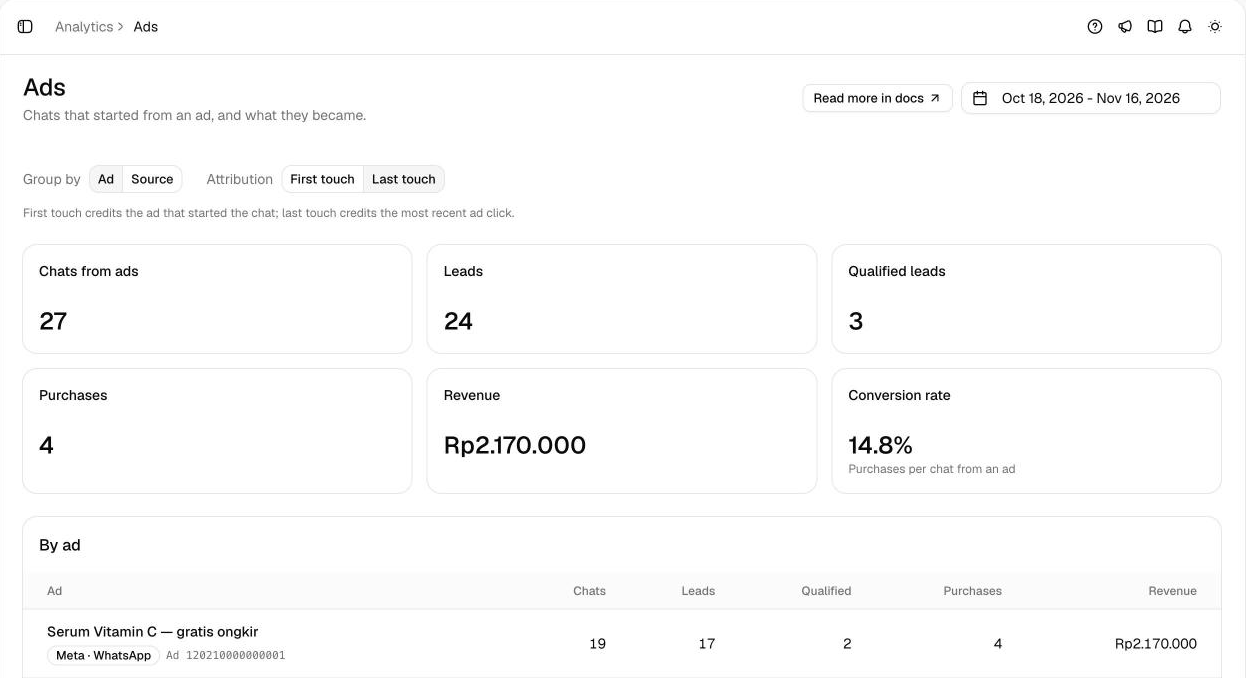
The numbers
- Chats from ads — chats that started from an ad.
- Leads — those chats where the customer left their details.
- Qualified leads — those chats your team, a tag or an automation marked qualified.
- Purchases — paid Commerce orders and chats marked won, with Revenue their total in rupiah.
- Conversion rate — purchases per chat from an ad.
Days follow your store's time zone, as on Sales: the business hours time zone when you've picked one, otherwise WIB.
Ad spend and ROAS aren't available yet. Revenue counts paid orders and chats marked as won.
What counts as a chat from an ad
- A WhatsApp, Messenger or Instagram chat that started from an ad.
- A website chat in the Chat widget, Spotlight or Chat Page whose visitor arrived from an ad: with an ad click id in the link, such as
fbclidfrom a Meta ad orttclidfrom a TikTok ad, or withutm_campaign parameters.
Group by and attribution
- Group by — Ad lists each ad, named by its headline or campaign (
utm_campaign); an ad Meta sent without a headline shows as Untitled ad with its ID. Source lists where the chats came from, such as WhatsApp or the Chat widget, per platform. - Attribution — First touch credits the ad that started the chat; Last touch credits the most recent ad click. A chat counts in the range when the ad touch it's credited to falls in the range.
The table, By ad or By source, lists each row's chats, leads, qualified leads, purchases and revenue, highest revenue first.
With no chat from an ad in the range, the page says so and links to Meta Ads.
Related
- Meta Ads — the results, how they're recorded, and sending them to Meta.
- Sales — every paid sale and who closed it.
- Analytics overview — the date range and the other analytics pages.